Want to learn how to add SearchView to RecyclerView in Android the modern, beginner-friendly way? In this step-by-step guide, you’ll build a live search list using Kotlin, AppCompat’s SearchView, a RecyclerView ListAdapter (DiffUtil), and a ViewModel with Kotlin Flows. You’ll also see a quick Java example, tips for Room database filtering, and a short Jetpack Compose alternative. By the end, you’ll know how to connect a SearchView to filter a RecyclerView list smoothly and efficiently.
What are SearchView and RecyclerView?
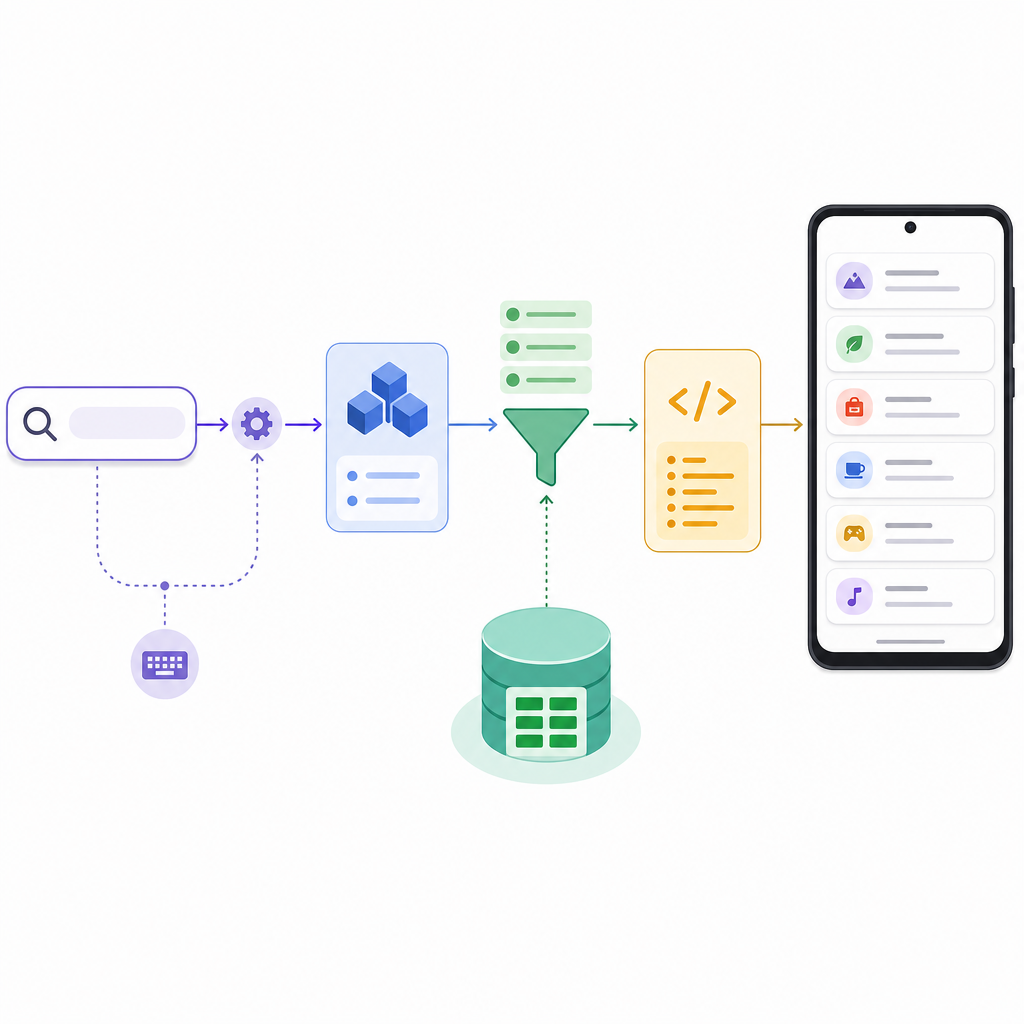
Search bar filtering a RecyclerView list in an Android app built with Kotlin.
RecyclerView displays a scrollable list of items efficiently. SearchView is a text input control (commonly placed in the app bar) that lets users type a query. Combining them gives you a live, responsive in-app search.
This tutorial focuses on AppCompat’s SearchView (androidx.appcompat.widget.SearchView) inside the app bar. It’s the recommended approach for View-based UIs.
How SearchView filters RecyclerView (flow)
1. User types in SearchView
→
2. Fragment forwards text to ViewModel (StateFlow)
→
3. ViewModel debounces and filters (in‑memory or Room/FTS)
→
4. Submit to ListAdapter (DiffUtil)
→
5. RecyclerView updates smoothly
Tip: Keep filtering in ViewModel; adapters should only render.
When should you add search to RecyclerView?
How SearchView input travels through ViewModel and adapter to refresh a RecyclerView.
Use SearchView with RecyclerView when:
You have a small/medium in-memory list and want to filter it live as the user types.
You store data locally with Room and want to search by name, title, or description using LIKE or FTS.
You want a simple, fast UX without navigating to a separate “search screen.”
For very large datasets or remote data, integrate the query with Room + Paging 3 or with your network API’s search endpoint.
Choose your search approach
Approach
Best for
How it filters
Pros
Watch‑outs
ViewModel + StateFlow + ListAdapter (Kotlin, this guide)
Small/medium in-memory lists, beginners
Filter in ViewModel with debounce
Clean architecture, smooth DiffUtil animations
Avoid heavy work on main thread; don’t mutate lists in place
Adapter implements Filterable (Java)
Very small lists, quick demos
Adapter filters its own copy
Minimal setup, no ViewModel needed
Harder to test; can get messy; not ideal for growth
Room (LIKE or FTS) + Flow
Persistent/local data; larger sets
Database runs the query and emits results
Scales better; offloads work to DB
Set up DAOs/entities; FTS requires extra table
Paging 3 + Room/API
Huge or remote datasets
Query drives new Pager/PagingSource
Streaming pages; memory efficient
More boilerplate; handle query resets carefully
Project setup (Kotlin, Views)
Make sure you have these dependencies in your module’s build.gradle:
// RecyclerView
implementation("androidx.recyclerview:recyclerview:1.3.2")
// AppCompat (for SearchView in the app bar)
implementation("androidx.appcompat:appcompat:1.7.0")
// Material (optional Toolbar/SearchBar UI)
implementation("com.google.android.material:material:1.12.0")
// Lifecycle + coroutines (for Flow in ViewModel)
implementation("androidx.lifecycle:lifecycle-runtime-ktx:2.8.4")
implementation("androidx.lifecycle:lifecycle-viewmodel-ktx:2.8.4")
implementation("org.jetbrains.kotlinx:kotlinx-coroutines-android:1.8.1")
Quick checklist: Add SearchView to RecyclerView (Kotlin)
Create a Toolbar menu item with app:actionViewClass="androidx.appcompat.widget.SearchView".
Build a ListAdapter with DiffUtil and a simple item layout.
Create a ViewModel with StateFlow for query and filtered list (use debounce).
In Fragment/Activity, inflate menu, get SearchView, set OnQueryTextListener, forward text to ViewModel.
Collect filtered list and call adapter.submitList(list).
Optional: Restore query after rotation by reading ViewModel.currentQuery and expanding the action view.
For larger data, move filtering to Room (LIKE/FTS) or Paging 3.
How to add SearchView to RecyclerView in Android (Kotlin, step by step)
This section shows a complete example for beginners: an in-memory list of countries filtered by a SearchView in the app bar. It uses a Fragment, a ViewModel with StateFlow, and a ListAdapter + DiffUtil for smooth updates.
State handling: ViewModel preserves the current query on rotation.
Java RecyclerView search example (small lists)
If you need a Java RecyclerView search example, here’s a minimal variant using Filterable inside the adapter. This is okay for small in-memory lists; for larger lists or databases, prefer the ViewModel + Flow approach.
Filtering with Room (LIKE and FTS) for larger data
For persistent data, let Room handle search and return a Flow to your ViewModel.
Room with LIKE
Kotlin
Code
class="cd-annotation">@Dao
interface CountryDao {
    class="cd-annotation">@Query("SELECT * FROM countries WHERE name LIKE '%' || :query || '%' ORDER BY name")
    fun searchCountries(query: String): kotlinx.coroutines.flow.Flow<List<CountryEntity>>
}
Room with Full-Text Search (FTS)
FTS is faster for long text and large datasets.
Kotlin
Code
class="cd-annotation">@Entity
data classCountryEntity(
class="cd-annotation">@PrimaryKey val id: Int,
val name: String
)
class="cd-annotation">@Fts4(contentEntity = CountryEntity::class)
class="cd-annotation">@Entity(tableName = "countries_fts")
data classCountryFts(
class="cd-annotation">@PrimaryKey(autoGenerate = true) val rowid: Int = 0,
val name: String
)
class="cd-annotation">@Dao
interface CountryFtsDao {
// FTS table uses MATCHclass="cd-annotation">@Query("SELECT countries.* FROM countries JOIN countries_fts ON (countries_fts.rowid = countries.id) WHERE countries_fts MATCH :query")
fun searchFts(query: String): kotlinx.coroutines.flow.Flow<List<CountryEntity>>
}
ViewModel with Room
Kotlin
Code
classCountriesRoomViewModel(
class="cd-keyword cd-access">private val dao: CountryDao
) : ViewModel() {
class="cd-keyword cd-access">private val query = MutableStateFlow("")
val results = query
.debounce(250)
.flatMapLatest { q -> dao.searchCountries(q) }
.stateIn(viewModelScope, SharingStarted.Lazily, emptyList())
fun onQueryChange(q: String) { query.value = q }
}
Now you only submit the Room results to your ListAdapter. For very large lists or remote search, integrate Paging 3 so your list loads pages as you type.
Paging 3 for huge or paged search
Keep a MutableStateFlow(query) in your ViewModel.
Each time the query changes, create a new Pager with a PagingSource that uses the query.
Submit the PagingData to a PagingDataAdapter.
This avoids loading the entire dataset into memory and keeps the UI smooth.
Material 3 SearchBar and Jetpack Compose (optional alternative)
If you’re building with Compose instead of RecyclerView, here is a live search in RecyclerView Android example equivalent using Material3’s SearchBar and LazyColumn:
Kotlin
Code
class="cd-annotation">@OptIn(androidx.compose.material3.ExperimentalMaterial3Api::class)
class="cd-annotation">@Composable
fun CountrySearchScreen(vm: CountriesViewModel) {
    var query by rememberSaveable { mutableStateOf("") }
    val items by vm.filtered.collectAsStateWithLifecycle()

    LaunchedEffect(query) { vm.onQueryChange(query) }

    androidx.compose.material3.SearchBar(
        query = query,
        onQueryChange = { query = it },
        onSearch = { /* no-op */ },
        active = true,
        onActiveChange = { /* keep active */ },
        placeholder = { Text("Search countries") }
    ) {
        LazyColumn {
            items(items, key = { it.id }) { country ->
                Text(
                    text = country.name,
                    modifier = Modifier
                        .fillMaxWidth()
                        .padding(16.dp)
                )
            }
        }
    }
}
Compose is great for new UIs, but if you’re learning classic Views, RecyclerView plus AppCompat SearchView remains perfectly valid.
Output / Result
When you run the app:
Tapping the search icon expands a SearchView in the toolbar.
As you type, the RecyclerView list updates instantly (debounced), showing only items matching your query (case-insensitive).
Clearing the text returns the full list. The query survives rotation and back navigation because it lives in the ViewModel.
Troubleshooting and tips
RecyclerView not filtering? Ensure you’re calling adapter.submitList(newList) with a fresh List instance from your ViewModel (not mutating the existing list in place).
SearchView events not firing? Use app:actionViewClass="androidx.appcompat.widget.SearchView" and set your OnQueryTextListener after inflating the menu.
Janky typing? Debounce query changes and do heavy work off the main thread (Flows handle this well). Avoid filtering giant lists on the UI thread.
Wrong case/locale? Normalize both query and item text with .lowercase() (or locale-aware comparison if needed).
Adapter shows stale data? When using ListAdapter, don’t call notifyDataSetChanged(). Just call submitList() with the latest list.
FAQ: People also ask
How do I connect a SearchView to filter a RecyclerView list?
Place AppCompat SearchView in the app bar (menu item with app:actionViewClass), set an OnQueryTextListener, and forward text changes to your ViewModel. The ViewModel filters the list (Flow/LiveData) and you submit the result to a ListAdapter.
Can I add search to RecyclerView without using a database?
Yes. Keep your list in memory and filter it in the ViewModel as the query changes. This is ideal for small/medium lists and learning projects.
What is the simplest way to implement RecyclerView search in Kotlin?
Use a Fragment + AppCompat SearchView + ViewModel with StateFlow + ListAdapter. It’s only a few files and gives you smooth updates and clean architecture.
How do I update the RecyclerView adapter when the SearchView text changes?
On each query update, emit a new filtered list from the ViewModel and call adapter.submitList(newList) in the Fragment/Activity.
Why is my RecyclerView not filtering when I type in SearchView?
Common causes: you didn’t attach OnQueryTextListener; you’re mutating the same List instance (DiffUtil won’t detect changes); you used the platform android.widget.SearchView instead of AppCompat; or you forgot to cast actionView to androidx.appcompat.widget.SearchView.
Key takeaways
The best beginner-friendly pattern is: SearchView in app bar → ViewModel filters via Flow → ListAdapter submits.
For databases, push filtering to Room (LIKE or FTS) and collect a Flow.
For huge data or network search, integrate with Paging 3.
Avoid legacy patterns like filtering in the adapter for large lists or using deprecated menu APIs.
By following this tutorial on How to add SearchView to RecyclerView in Android, you’ve learned a simple, modern approach suitable for students and Android beginners. Adapt it to your own data source, and when your app grows, switch to Room and Paging 3 for scalable, performant search.