
The Java String class with examples is one of the most important topics for students, beginners, and Java learners. Strings represent text such as names, messages, and user input. In this practical guide, you will learn what a String is in Java, why it is immutable, how to create and compare Strings, common Java String methods for beginners, string concatenation in Java, how to split and join Strings, and how to convert a String to an int. Every concept is followed by simple examples you can run and verify.
What is a String in Java?
In Java, a String is an object from the java.lang.String class that represents a sequence of characters. It is widely used for text processing: printing messages, reading input, parsing data, and building outputs. Strings are immutable, which means once a String object is created, its value cannot be changed. Operations like concatenation or substring create new String objects rather than modifying the original.
Why are Strings immutable?
- Security: Strings are used in sensitive places (e.g., file paths, class names); immutability prevents accidental or malicious changes.
- Caching and performance: Java can safely reuse String literals via a String pool.
- Thread-safety: Immutable objects can be shared across threads without synchronization.
- Prefer string literals (e.g.,
"Hello"); they use the String pool efficiently. - Strings are immutable: methods like
concat,replace,substringreturn a new String—store the result. - Use
equals()orequalsIgnoreCase()for content comparison, not==. - For repeated concatenation (loops), use
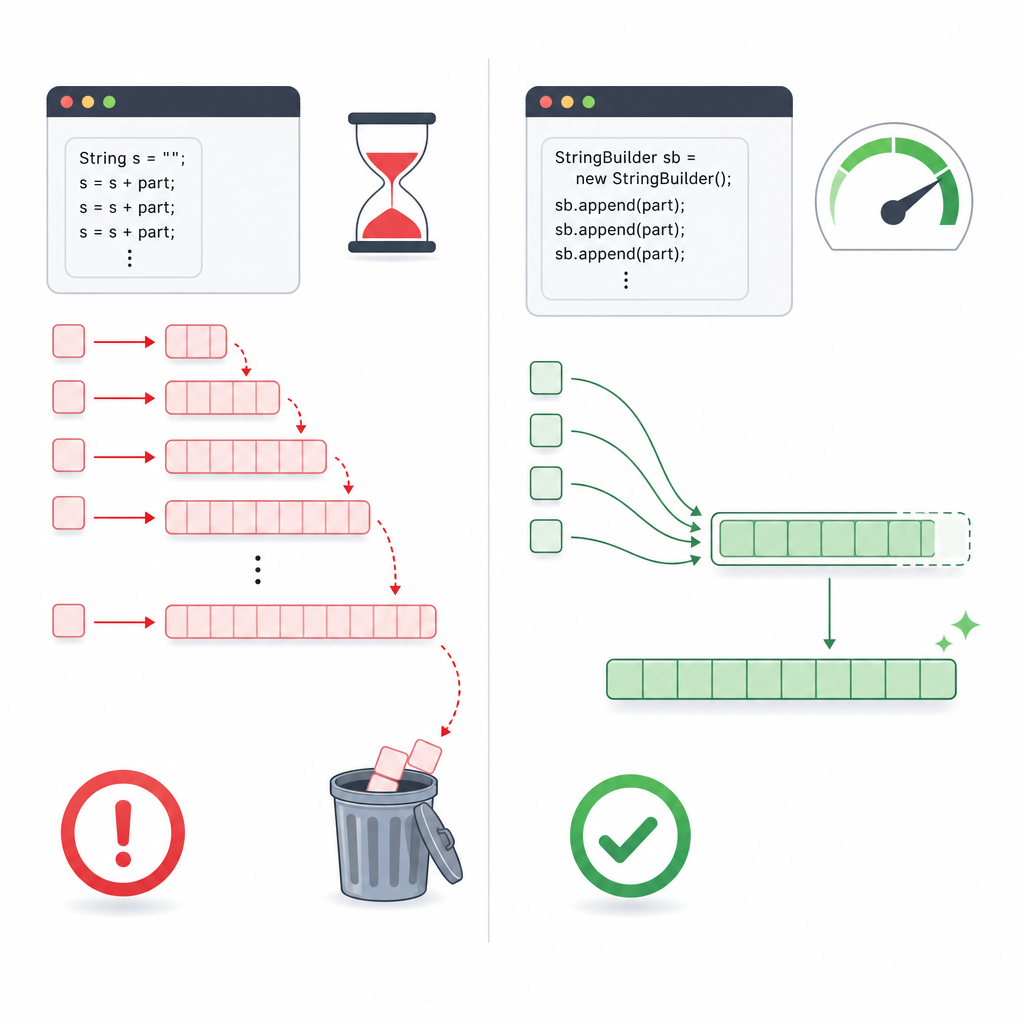
StringBuilderfor speed and fewer allocations. split()uses regex; escape special characters (e.g.,"\."for a dot).- Be null-safe: call
"text".equals(s)or useObjects.equals(a, b).
How to create a String in Java (syntax and examples)
You can create Strings in several ways: using string literals, the new keyword, from a character array, or using String.valueOf(). Below is a beginner-friendly example.
class="cd-keyword cd-access">public class CreateStringsDemo {
    class="cd-keyword cd-access">public static void main(String[] args) {
        // Using a string literal (preferred)
        String literal = "Hello";

        // Using new (creates a new object; usually not necessary)
        String viaNew = new String("Hello");

        // From a character array
        char[] letters = {'J', 'a', 'v', 'a'};
        String fromChars = new String(letters);

        // From other types (int to String)
        String fromValue = String.valueOf(123);

        System.out.println(literal);
        System.out.println(viaNew);
        System.out.println(fromChars);
        System.out.println(fromValue);
    }
}Hello
Hello
Java
123Java String immutability explained for beginners
When you “change” a String, Java actually creates a new object. The original String remains unchanged.
class="cd-keyword cd-access">public class ImmutabilityDemo {
    class="cd-keyword cd-access">public static void main(String[] args) {
        String s = "Code";
        s.concat("Desire"); // result is ignored
        System.out.println("After concat without assignment: " + s);

        s = s.concat("Desire"); // assign to capture the new String
        System.out.println("After concat with assignment: " + s);
    }
}After concat without assignment: Code
After concat with assignment: CodeDesireHow to compare Strings in Java
Beginners often confuse == with equals(). The == operator compares references (memory addresses), while equals() compares the content (characters) of two Strings. Use equalsIgnoreCase() to compare while ignoring case.
| Comparison | Checks | Use case | Example result |
|---|---|---|---|
== |
Reference equality (same object) | Rare in practice for Strings | May be true for same literal, false otherwise |
equals() |
Content equality (case-sensitive) | Standard String comparison | "Java".equals("Java") is true |
equalsIgnoreCase() |
Content equality (case-insensitive) | Compare user input, case-insensitive checks | "java".equalsIgnoreCase("Java") is true |
class="cd-keyword cd-access">public class CompareStringsDemo {
    class="cd-keyword cd-access">public static void main(String[] args) {
        String a = "Java";
        String b = "Java";
        String c = new String("Java");
        String d = "java";

        System.out.println(a == b);          // true (same literal, interned)
        System.out.println(a == c);          // false (different objects)
        System.out.println(a.equals(c));     // true (content equal)
        System.out.println(a.equals(d));     // false (case differs)
        System.out.println(a.equalsIgnoreCase(d)); // true
    }
}true
false
true
false
trueNull-safe comparison tip: call equals on a known non-null String or use java.util.Objects.equals(a, b).
class="cd-keyword cd-access">public class NullSafeEqualsDemo {
    class="cd-keyword cd-access">public static void main(String[] args) {
        String x = null;

        // Safe: call equals on the literal
        System.out.println("test".equals(x)); // false

        // Unsafe: would throw NullPointerException
        // System.out.println(x.equals(___CDPHSTR1___));
    }
}falseString concatenation in Java
You can join Strings using +, concat(), or builders like StringBuilder for loops.
class="cd-keyword cd-access">public class ConcatDemo {
    class="cd-keyword cd-access">public static void main(String[] args) {
        String first = "Hello";
        String second = "World";

        String withPlus = first + " " + second + "!";
        String withMethod = first.concat(" ").concat(second);

        System.out.println(withPlus);
        System.out.println(withMethod);

        // Avoid ___CDPHSTR5___ in loops; it creates many temporary Strings
        String s = "";
        for (int i = 1; i <= 3; i++) {
            s = s + i;
        }
        System.out.println(s);

        // Prefer StringBuilder in loops
        StringBuilder sb = new StringBuilder();
        for (int i = 1; i <= 3; i++) {
            sb.append(i);
        }
        System.out.println(sb.toString());
    }
}Hello World!
Hello World
123
123StringBuilder for loops; use + only for simple one-off concatenations.Java String methods for beginners (with examples)
Here are frequently used methods you will need often.
class="cd-keyword cd-access">public class MethodsDemo {
    class="cd-keyword cd-access">public static void main(String[] args) {
        String s = "  Java Strings  ";

        System.out.println("length=" + s.length());
        System.out.println("charAt(2)=" + s.charAt(2));
        System.out.println("substring(2, 6)=" + s.substring(2, 6));
        System.out.println("indexOf("Str")=" + s.indexOf("Str"));
        System.out.println("contains("Java")=" + s.contains("Java"));
        System.out.println("startsWith("  Ja")=" + s.startsWith("  Ja"));
        System.out.println("endsWith("gs  ")=" + s.endsWith("gs  "));
        System.out.println("toUpperCase()=" + s.toUpperCase());
        System.out.println("toLowerCase()=" + s.toLowerCase());
        System.out.println("trim()=" + s.trim());

        // Note: isBlank() is available in Java 11+
        // System.out.println(___CDPHSTR19___   ___CDPHSTR20___ + ___CDPHSTR21___.isBlank());
    }
}length=17
charAt(2)=J
substring(2, 6)=Java
indexOf("Str")=7
contains("Java")=true
startsWith(" Ja")=true
endsWith("gs ")=true
toUpperCase()= JAVA STRINGS
toLowerCase()= java strings
trim()=Java StringsHow to split and join Strings in Java (examples)
Use split(regex) to break a String into parts and String.join(delimiter, elements) to combine them. Remember split expects a regular expression. If you need to split by a dot, escape it like split("\\.").
class="cd-keyword cd-access">public class SplitJoinDemo {
    class="cd-keyword cd-access">public static void main(String[] args) {
        String colors = "red,green,blue";
        String[] parts = colors.split(",");

        for (String p : parts) {
            System.out.println(p);
        }

        String joined = String.join(" - ", parts);
        System.out.println("joined=" + joined);
    }
}red
green
blue
joined=red - green - blueConvert String to int in Java (with example)
To convert a String to an integer, use Integer.parseInt() for a primitive int or Integer.valueOf() for an Integer object. Trim input and handle NumberFormatException.
class="cd-keyword cd-access">public class ParseIntDemo {
    class="cd-keyword cd-access">public static void main(String[] args) {
        String num = " 42 ";
        try {
            int value = Integer.parseInt(num.trim());
            System.out.println(value + 8); // 50
        } catch (NumberFormatException e) {
            System.out.println("Invalid number: " + num);
        }

        Integer boxed = Integer.valueOf("100");
        System.out.println(boxed);
    }
}50
100StringBuilder vs StringBuffer (quick note with example)
StringBuilder: not synchronized, faster, use in single-threaded code (most cases in beginners’ programs).StringBuffer: synchronized (thread-safe), slightly slower, use when multiple threads may access the same builder.
class="cd-keyword cd-access">public class BufferDemo {
    class="cd-keyword cd-access">public static void main(String[] args) {
        StringBuffer sb = new StringBuffer("Hi");
        sb.append(" Java");
        System.out.println(sb.toString());
    }
}Hi Java| Type | Mutable? | Thread-safe? | Best for | Notes |
|---|---|---|---|---|
String |
No (immutable) | Yes (by immutability) | Constants, messages, keys, light concatenation | Interned in pool when literal; safe to share. |
StringBuilder |
Yes | No | Loops, heavy concatenation in single thread | Fastest in most beginner apps. |
StringBuffer |
Yes | Yes (synchronized) | When multiple threads append to the same builder | Slightly slower due to locking. |
char[] |
Yes (array) | No | Mutable character data, password handling | Can be cleared after use (unlike String). |
String for values, StringBuilder to build them.Common mistakes and how to avoid them
- Using
==to compare Strings. Always useequals()orequalsIgnoreCase()for content comparison. - Forgetting that Strings are immutable. Methods like
concat,replace, andsubstringreturn new Strings—assign the result to a variable. - Using
+in large loops. PreferStringBuilderfor better performance. - Not trimming input before parsing or comparing, which can cause unexpected mismatches or exceptions.
- Calling
someString.equals("text")whensomeStringmight be null. Use"text".equals(someString)orObjects.equals(a, b). - Misusing
splitwith regex special characters. Escape characters like.,|,*when needed.
Practice exercises
- Read a line like
"Alice,20;Bob,25;Cara,19". Split it into people, then into name and age, and print “Name: Alice, Age: 20” etc. - Write a method that takes a sentence and returns a new sentence with each word capitalized (first letter uppercase, rest lowercase).
- Prompt the user for two words and check if they are anagrams (ignoring case and spaces).
- Replace all multiple spaces in a String with a single space (use regex).
- Convert a String of numbers like
"1 2 3 4"into the sum of those numbers.
FAQ: Java String class with examples
What is the String class in Java and why is it immutable?
The String class represents text and is immutable to improve security, caching via the String pool, and thread-safety. Any operation that appears to change a String actually returns a new String.
How do I create a String in Java?
Use a string literal like String s = "Hello"; (recommended), or construct from other sources such as new String("Hello"), new String(charArray), or String.valueOf(number).
What is the difference between == and equals() for Strings in Java?
== checks if two references point to the same object; equals() checks if two Strings have the same characters. For content comparison, use equals() or equalsIgnoreCase().
How can I concatenate Strings in Java?
Use + for simple cases, concat() for chaining, and StringBuilder for loops or performance-sensitive concatenation.
How do I convert a String to an int in Java?
Use Integer.parseInt(str.trim()) to get a primitive int or Integer.valueOf(str) for an Integer. Handle NumberFormatException for invalid input.
Related Java tutorials
Continue learning with our Java basics section: Java Tutorials at CodDesire.