
C++ set vs unordered_set explained for beginners: if you’ve just started learning the Standard Template Library (STL), two of the most useful containers you’ll meet are std::set and std::unordered_set. Both keep only unique values, but they store and access those values differently. In this beginner-friendly guide, we’ll cover what they are, how to use them with simple examples, the time complexity you should expect, common mistakes to avoid, and clear tips on when to choose one over the other.
- std::set: ordered (sorted), unique keys, O(log n) operations, supports
lower_bound/upper_bound, stable iteration order. - std::unordered_set: hash-based, unique keys, average O(1) operations, no order; tune with
reserve/rehash/max_load_factor. - Choose set for sorted output and range queries; choose unordered_set for fastest average membership checks when order doesn’t matter.
- Need duplicates? Use
std::multiset.
What is set in C++ STL?
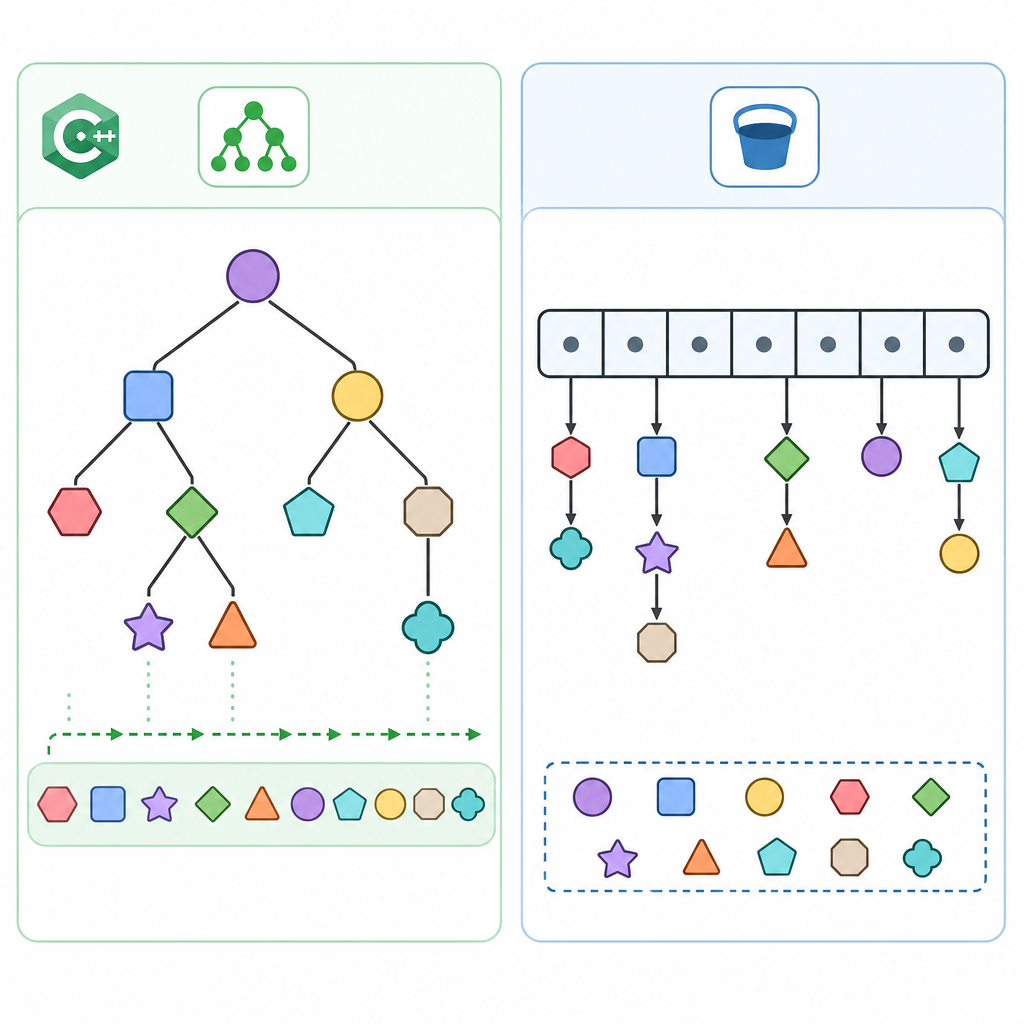
std::set is an ordered associative container that stores unique keys in sorted order. Under the hood, it’s typically implemented as a balanced binary search tree (like a red–black tree). The key properties are:
- Automatically sorts elements (ascending by default using std::less).
- No duplicates are stored; inserting a duplicate has no effect.
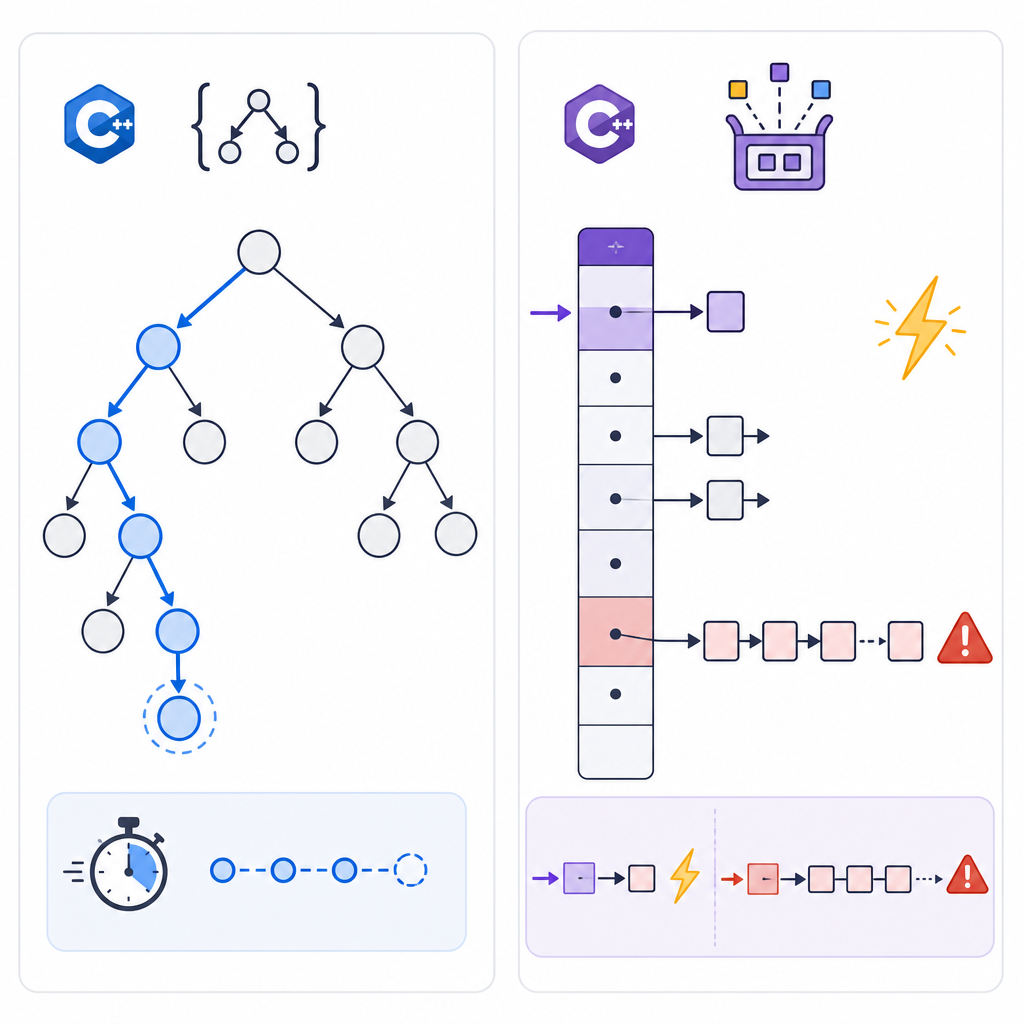
- Search/insert/erase operations take O(log n) time.
- Iteration visits elements in sorted order.
Syntax and a simple example (set)
#class="cd-package">include <iostream>
#class="cd-package">include <set>

int main() {
    std::set<int> nums = {5, 2, 5, 1, 3}; // duplicate 5 is ignored
    nums.insert(4);                        // O(log n)

    std::cout << "Size: " << nums.size() << "n";

    std::cout << "Sorted values: ";
    for (int x : nums) {
        std::cout << x << " ";          // 1 2 3 4 5
    }
    std::cout << "n";

    // Membership test: count() works in all standards
    std::cout << "Has 3? " << (nums.count(3) ? "yes" : "no") << "n";

    return 0;
}Size: 5
Sorted values: 1 2 3 4 5
Has 3? yesTip: In C++20 and later, you can use nums.contains(3) instead of count(3) for clearer intent.
What is unordered_set in C++?
std::unordered_set is a hash-based associative container that also stores unique keys, but without any defined order. The key properties are:
- Elements are distributed into buckets based on a hash function.
- Average O(1) time for search/insert/erase (worst-case O(n)).
- No guaranteed iteration order; order may change after inserts/rehashing.
- You can tune performance using
reserve,rehash, andmax_load_factor.
Syntax and a simple example (unordered_set)
#class="cd-package">include <iostream>
#class="cd-package">include <unordered_set>
#class="cd-package">include <string>

int main() {
    std::unordered_set<std::string> words = {"one", "two", "two", "three"}; // duplicate ___CDPHSTR4___ ignored
    words.insert("four"); // Average O(1)

    std::cout << "Size: " << words.size() << "n";

    std::cout << "Values (order unspecified): ";
    for (const auto& w : words) {
        std::cout << w << " ";  // Order can differ across runs/compilers
    }
    std::cout << "n";

    std::cout << "Contains 'two'? " << (words.count("two") ? "yes" : "no") << "n";
    return 0;
}Size: 4
Values (order unspecified): four three two one
Contains 'two'? yesNote: The order shown in the output is just an example; your program may print a different order.
C++ set vs unordered_set explained for beginners
Here is a beginner-friendly comparison:
| Feature | std::set | std::unordered_set |
|---|---|---|
| Ordering | Sorted (ascending by default) | No defined order |
| Typical implementation | Balanced tree (node-based) | Hash table (buckets) |
| Lookup/insert/erase | O(log n) | Average O(1), worst-case O(n) |
| Duplicates | Not allowed | Not allowed |
| Iteration order | Sorted and stable w.r.t. order | Unspecified; may change after rehash |
| Range queries (lower_bound/upper_bound) | Supported and efficient | Not provided (no sort order) |
| Capacity tuning | Not applicable | reserve, rehash, max_load_factor |
| Use when | You need sorted, unique values or range queries | You need fast membership checks and order doesn’t matter |
When to use set vs unordered_set
lower_bound/upper_bound.reserve(N).std::multiset regardless of order needs.- Use std::set when:
- You need the elements in sorted order for iteration or printing.
- You want to perform range queries using
lower_bound,upper_bound, orequal_range. - You care about consistent iteration order across runs.
- Use std::unordered_set when:
- You primarily need fast membership testing (e.g., “is X present?”).
- Order doesn’t matter (like a dictionary of blocked words or visited IDs).
- You can pre-
reservecapacity for large bulk insertions to improve performance.
How to use set in C++ with simple examples
Example: Range query with lower_bound
Find numbers in [10, 20) efficiently using std::set:
#class="cd-package">include <iostream>
#class="cd-package">include <set>

int main() {
    std::set<int> s = {5, 12, 18, 20, 25, 7, 15};
    auto first = s.lower_bound(10); // first element not less than 10
    auto last  = s.lower_bound(20); // first element not less than 20

    std::cout << "Elements in [10, 20): ";
    for (auto it = first; it != last; ++it) {
        std::cout << *it << " ";
    }
    std::cout << "n";
    return 0;
}Elements in [10, 20): 12 15 18Example: Using contains (C++20)
If your compiler supports C++20 or later, prefer contains for membership tests:
#class="cd-package">include <iostream>
#class="cd-package">include <set>

int main() {
    std::set<int> s = {1, 2, 3};
    std::cout << (s.contains(2) ? "yes" : "no") << "n"; // Compile with -std=c++20 or later
    return 0;
}
unordered_set tutorial for C++ beginners
Example: Fast stop-word filter
Use std::unordered_set to quickly check if a word is a stop word:
#class="cd-package">include <iostream>
#class="cd-package">include <unordered_set>
#class="cd-package">include <vector>
#class="cd-package">include <string>

int main() {
    std::unordered_set<std::string> stop = {"a", "an", "the", "of", "and", "to"};
    std::vector<std::string> tokens = {"the", "quick", "brown", "fox", "jumps", "over", "the", "lazy", "dog"};

    std::cout << "Filtered: ";
    for (const auto& t : tokens) {
        if (!stop.count(t)) {
            std::cout << t << " ";
        }
    }
    std::cout << "n";
    return 0;
}Filtered: quick brown fox jumps over lazy dogExample: Reserve capacity to reduce rehashing
For many inserts, call reserve first to reduce rehashing costs and keep O(1) average behavior:
#class="cd-package">include <iostream>
#class="cd-package">include <unordered_set>

int main() {
    std::unordered_set<int> us;
    us.reserve(1000); // plan capacity before bulk inserts

    for (int i = 0; i < 1000; ++i) {
        us.insert(i);
    }

    std::cout << "Size: " << us.size() << "n";
    std::cout << "Bucket count: " << us.bucket_count() << "n";
    std::cout << "Load factor: " << us.load_factor() << "n";
    return 0;
}Size: 1000
Bucket count: 1024
Load factor: 0.976562Values shown above are illustrative; actual bucket counts and load factors depend on the implementation.
Time complexity of set vs unordered_set in C++ explained
- std::set: O(log n) for insert/find/erase because it’s tree-based. This is predictable and does not depend on hashing.
- std::unordered_set: average O(1) for insert/find/erase due to hashing; however, in the worst case (e.g., many collisions), operations can degrade to O(n). Good hash functions and using
reservehelp maintain average O(1) performance.
Neither container allows duplicates. Both give you “membership” semantics, but choose based on whether you need order and which performance profile suits your problem.
C++ set and unordered_set examples
Example: Deduplicate and print sorted (use set)
#class="cd-package">include <iostream>
#class="cd-package">include <set>
#class="cd-package">include <vector>

int main() {
    std::vector<int> input = {7, 3, 3, 9, 1, 7, 2};
    std::set<int> unique_sorted(input.begin(), input.end());

    std::cout << "Unique sorted: ";
    for (int x : unique_sorted) {
        std::cout << x << " ";
    }
    std::cout << "n";
    return 0;
}Unique sorted: 1 2 3 7 9Example: Fast membership checks (use unordered_set)
#class="cd-package">include <iostream>
#class="cd-package">include <unordered_set>

int main() {
    std::unordered_set<int> seen = {10, 20, 30};
    int queries[] = {20, 25, 30, 35};

    for (int q : queries) {
        std::cout << q << (seen.count(q) ? " present" : " absent") << "n";
    }
    return 0;
}20 present
25 absent
30 present
35 absentCommon mistakes with C++ set and unordered_set and how to fix
- Expecting duplicates to be stored: Both containers keep unique keys only. If you need duplicates, use
std::multisetor another container. - Relying on order in unordered_set: Iteration order is unspecified and may change after insertions or rehashing. If you need sorted output, use
std::setor copy keys to a vector and sort. - Modifying keys in-place: Elements are keys; changing them breaks tree/hash invariants. Instead, erase and insert the new value:
Code
#class="cd-package">include <set> int main() { std::set<int> s = {1, 2, 3}; auto it = s.find(2); if (it != s.end()) { int updated = 4; s.erase(it); s.insert(updated); } } - Keeping unordered_set iterators across rehash: Rehash invalidates iterators (but not references/pointers to elements). Avoid storing iterators long-term; consider calling
reservefirst or reacquire iterators after rehash-sensitive operations. - Assuming unordered_set is always faster: It’s usually faster for pure membership checks, but hash quality, rehashing, and workload can make
std::setcompetitive or better in some cases. - Using set when you actually need indexing:
std::sethas bidirectional iterators, not random access. If you need indexed access, usestd::vectororstd::deque, and sort or deduplicate as needed. - Forgetting to tune unordered_set for bulk insert: Call
reserveto reduce costly rehashes when inserting many elements. - Older compilers and contains():
containsrequires C++20. On older standards, usecountorfind.
How do I choose between set, unordered_set, and vector?
- std::set: Unique + sorted + O(log n) operations + efficient range queries.
- std::unordered_set: Unique + very fast average membership checks + no order.
- std::vector: Best for contiguous storage and fast indexed access. For membership queries, you’ll need to sort and use
binary_searchor maintain a companionunordered_set.
Rule of thumb: if you just need fast “is X present?” and order doesn’t matter, pick unordered_set. If you need sorted results or range queries, pick set. If you need random access by index, use vector plus algorithms.
Quick modern tips
- Use contains (C++20):
s.contains(x)orus.contains(x)is clearer thancount. - Bulk insert ranges (C++23):
insert_rangeon supporting compilers improves ergonomics for inserting many elements. - Move nodes between containers (C++17):
extractandmergelet you move elements without reallocating. - Heterogeneous lookup: With transparent comparators (
std::less<>) or transparent hash/equality, you can search aset<std::string>usingstd::string_viewwithout constructing a temporary. Great for performance when dealing with many lookups.
FAQ
What is the difference between set and unordered_set in C++?
set keeps unique elements in sorted order with O(log n) operations. unordered_set keeps unique elements in no particular order with average O(1) operations thanks to hashing, but worst-case O(n).
When should I use set instead of unordered_set?
Use set when you need sorted iteration or range queries using lower_bound/upper_bound. If you only need fast membership checks and don’t care about order, prefer unordered_set.
Does unordered_set allow duplicate values in C++?
No. Both set and unordered_set store only unique keys. If you need duplicates, use std::multiset.
Why is set ordered and unordered_set not in C++?
set is tree-based, which maintains keys in sorted order by the comparator. unordered_set is hash-based, which groups elements by hash into buckets, so there’s no defined global order.
How do I choose between set, unordered_set, and vector in C++?
If you need sorted unique values or range queries, use set. For fastest average-time membership checks without order, use unordered_set. For index-based access or tight memory locality, use vector and sort/binary-search or pair it with an unordered_set for fast lookups.
Sources / Further reading
- std::set — cppreference: https://en.cppreference.com/w/cpp/container/set
- std::unordered_set — cppreference: https://en.cppreference.com/cpp/container/unordered_set
- unordered_set Class — Microsoft Learn: https://learn.microsoft.com/en-us/cpp/standard-library/unordered-set-class?view=msvc-170
- C++20: Heterogeneous Lookup in (Un)ordered Containers — C++ Stories: https://www.cppstories.com/2021/heterogeneous-access-cpp20/
- C++ Working Draft N4950 (C++23): https://www.open-std.org/jtc1/sc22/wg21/docs/papers/2023/n4950.pdf
Want to keep learning C++ with clear, beginner-friendly tutorials? Visit our C++ hub: CodDesire C++ Tutorials.