
Pointers look scary at first, but they are just variables that store memory addresses. In this tutorial, you’ll find C++ pointers explained for beginners with clear examples you can run. We’ll cover what a pointer is, why it’s used, how to declare and initialize pointers in C++, how to use the & and * operators, pointers with arrays and functions, common mistakes, and modern, safer alternatives like smart pointers. If you’re following our C++ track, you can also explore more lessons on the CodDesire C++ section.
- A pointer stores an address; use
&to take an address and*to access the pointee. - Always initialize pointers; use
nullptrwhen you don’t have a valid target. - Respect lifetimes and bounds to avoid dangling and out-of-bounds errors.
- Prefer references for required, non-null access; use pointers for optional/reseatable access and array traversal.
- In modern code, avoid manual
new/delete; prefer containers and smart pointers.
What is a pointer in C++ and why is it used?
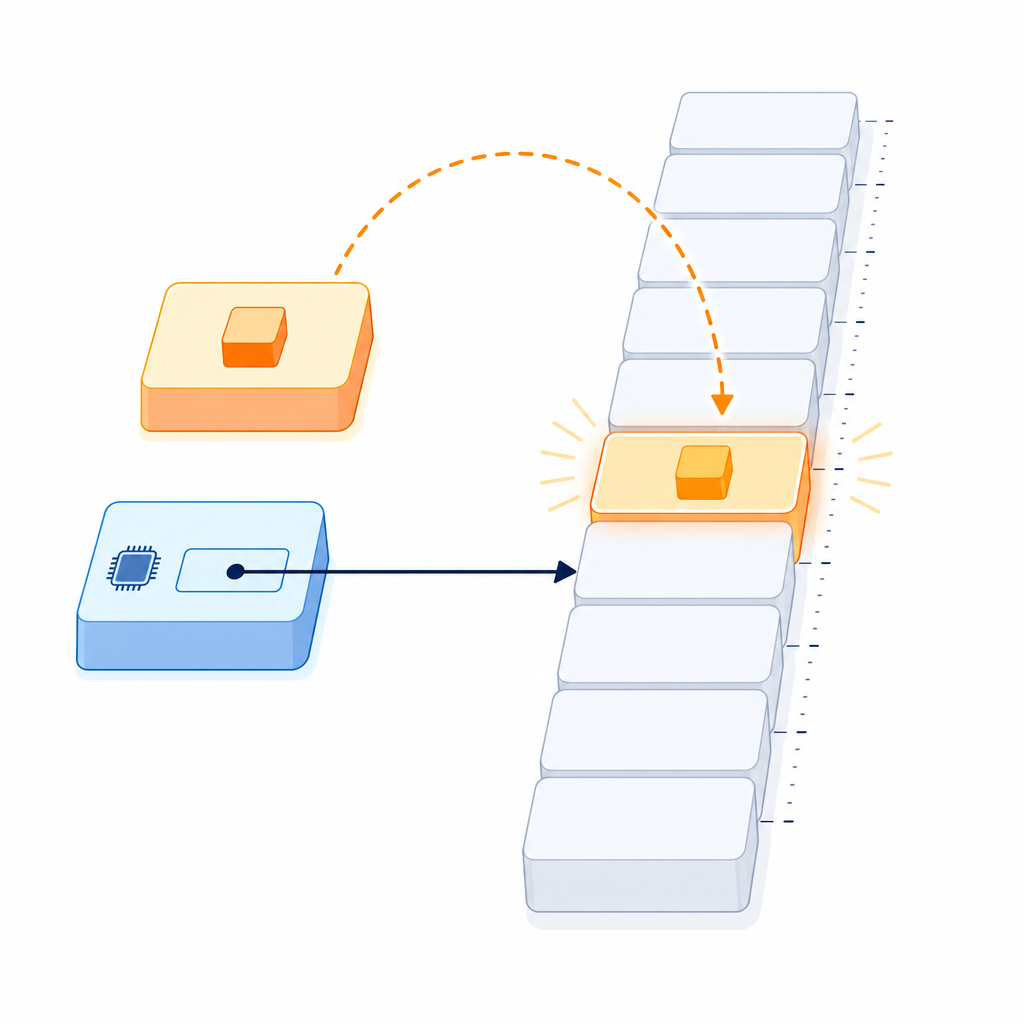
A pointer is a typed variable that holds the memory address of another object (or function). You use the address-of operator (&) to get an address, and the dereference operator (*) to access the object that a pointer points to.
Why pointers matter:
- They let functions modify variables passed in by address.
- They enable dynamic data structures and low-level control when necessary.
- They interoperate with C APIs and system interfaces that expect raw pointers.
- They provide efficient access to arrays and buffers.
Modern C++ tip: learn raw pointer basics, but prefer RAII (automatic resource management) and standard containers like std::vector or std::string in new code. Use smart pointers (std::unique_ptr, std::shared_ptr, std::weak_ptr) to express ownership safely.
C++ pointer basics: syntax, & and * operators
How to declare and initialize pointers in C++
Declaration uses T* where T is the pointed-to type. Always initialize your pointers—use nullptr when you don’t have a target yet.
#class="cd-package">include <iostream>

int main() {
    int value = 42;

    int* p = &value;        // p holds the address of value
    std::cout << "Before: value = " << value << "n";

    *p = 7;                 // dereference p to modify value
    std::cout << "After:  value = " << value << "n";

    int* q = nullptr;       // modern null pointer literal
    if (q == nullptr) {
        std::cout << "q is nulln";
    }
    return 0;
}Before: value = 42
After: value = 7
q is nullUnderstanding the & and * operators
&(address-of) gives you the address of an existing object:int* p = &x;*(dereference) lets you access the object a pointer points to:*p = 10;writes through the pointer.- Tip: The
*symbol appears in both declaration (int* p;) and dereference (*p); they are different uses of the same symbol.
Have an object
Take its address
Store in a pointer
Check before use
Read/write via *
Reseat or prefer RAII
How to use pointers in C++ safely
- Initialize every pointer. Use
nullptrif not set yet. - Check for
nullptrbefore dereferencing when a pointer may be null. - Keep lifetimes in mind: a pointer must not outlive the object it points to (avoid dangling pointers).
- Avoid manual
new/deletein beginner code. Prefer automatic storage (int x;), containers (std::vector,std::string), or smart pointers.
Pointers and const: pointer-to-const vs const pointer
You can make either the pointed-to value, or the pointer itself, const (or both):
const int* pmeans “pointer to const int” — you can’t modify the int viap, but you can reseatp.int* const pmeans “const pointer to int” — the pointer can’t change where it points, but you can modify the int.const int* const pmakes both fixed.
#class="cd-package">include <iostream>

int main() {
    int x = 10;

    const int* p_to_const = &x;   // cannot modify x through p_to_const
    std::cout << *p_to_const << "n";

    int* const const_ptr = &x;    // cannot reseat const_ptr
    *const_ptr = 20;              // OK: modifies x
    std::cout << x << "n";

    // p_to_const = nullptr;      // OK: can reseat pointer-to-const
    // *p_to_const = 5;           // ERROR: cannot modify through pointer-to-const
    // int y = 30;
    // const_ptr = &y;            // ERROR: cannot reseat const pointer
    return 0;
}10
20Pointer arithmetic, arrays, and strings
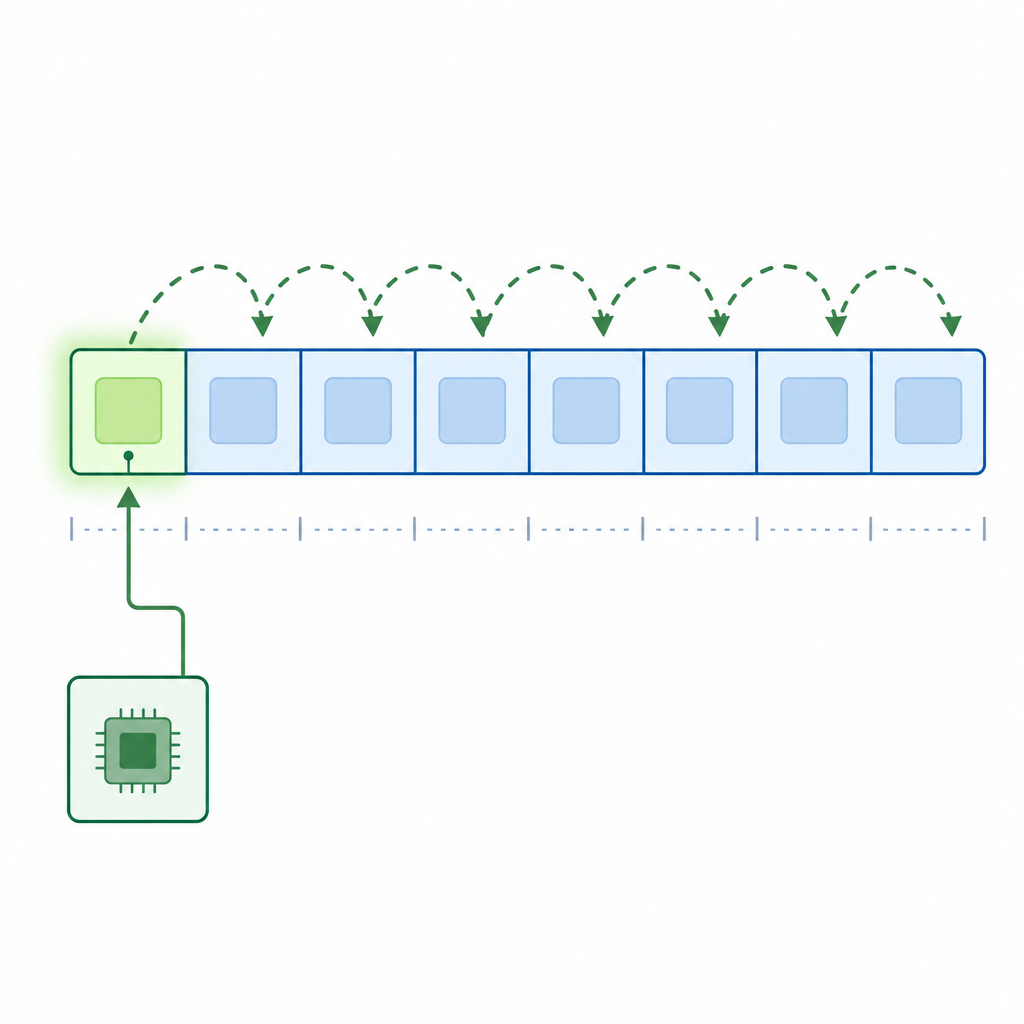
Pointers and arrays are closely related. An array name often “decays” to a pointer to its first element when passed to a function. Pointer arithmetic (like p + i) is only valid within the same array (including one-past-the-end). Forming or using out-of-bounds pointers is undefined behavior—avoid it.
Iterate an array with a pointer
#class="cd-package">include <iostream>

int main() {
    int numbers[5] = {1, 2, 3, 4, 5};
    int* p = numbers; // array decays to pointer to first element

    for (int i = 0; i < 5; ++i) {
        std::cout << *(p + i) << " ";
    }
    std::cout << "n";
    return 0;
}1 2 3 4 5Pointers with C-style strings
A C-style string is a char array ending with a '' (null terminator). You can walk it with a pointer:
#class="cd-package">include <iostream>

int main() {
    const char* s = "Hello";
    const char* p = s;

    while (*p != '') {
        std::cout << *p;
        ++p;
    }
    std::cout << "n";
    return 0;
}HelloPassing arrays to functions as pointers
Because arrays decay to pointers, you’ll often see functions that accept a pointer plus a size. Use a const pointer for read-only access.
#class="cd-package">include <iostream>
#class="cd-package">include <cstddef>

std::size_t sum(const int* data, std::size_t n) {
    std::size_t total = 0;
    for (std::size_t i = 0; i < n; ++i) {
        total += static_cast<std::size_t>(data[i]);
    }
    return total;
}

int main() {
    int a[4] = {3, 5, 7, 9};
    std::cout << sum(a, 4) << "n"; // array decays to const int*
    return 0;
}24Modern alternative (C++20): use std::span<T> to pass array views with size information, which is safer and more expressive.
#class="cd-package">include <iostream>
#class="cd-package">include <span>

int sum_span(std::span<const int> s) {
    int total = 0;
    for (int v : s) total += v;
    return total;
}

int main() {
    int a[3] = {2, 4, 6};
    std::cout << sum_span(a) << "n"; // implicit conversion to span
    return 0;
}12Using pointers with functions (modify via address)
Passing a pointer lets the function modify the caller’s variable. This is a common beginner pattern:
#class="cd-package">include <iostream>

void increment(int* p) {
    if (p) { *p += 1; }  // check for nullptr before dereferencing
}

int main() {
    int x = 10;
    increment(&x);       // pass address of x
    std::cout << x << "n";
    return 0;
}11Pointers vs references in C++ for beginners
Both pointers and references provide indirect access, but they signal different intent:
| Feature | Pointer | Reference |
|---|---|---|
| Can be null? | Yes (use nullptr) |
No (must refer to a valid object) |
| Can be reseated? | Yes (point to something else) | No (binds once) |
| Syntax to access | *p, p-> |
Use like a normal variable |
| Common use | Optional or array-like parameters, interop | Required, non-null aliasing |
Guideline: prefer references when non-null, non-reseatable access is intended. Use pointers to signal optionality or when you need reseating.
Ownership, heap memory, and smart pointers (modern practice)
In modern C++, a raw T* is typically non-owning: it doesn’t manage the lifetime of the object it points to. Avoid writing new/delete in your own code. Prefer:
- Automatic storage:
int x = 5; - Standard containers:
std::vector<T>,std::string - Smart pointers when dynamic lifetime is required:
std::unique_ptr<T>for sole ownership (std::make_unique)std::shared_ptr<T>only when ownership must be shared (std::make_shared)std::weak_ptr<T>to observe ashared_ptrwithout extending its lifetime
Example: managing a single object with std::unique_ptr—no manual delete needed.
#class="cd-package">include <iostream>
#class="cd-package">include <memory>

int main() {
    std::unique_ptr<int> up = std::make_unique<int>(99);
    std::cout << *up << "n";
    // up automatically deletes the int when it goes out of scope
    return 0;
}99If you need a raw pointer for interop, use up.get() to access it while keeping the unique_ptr alive at the call site. For pointer-like types and iterators, std::to_address (C++20) provides a well-defined way to obtain a raw pointer.
Note: std::shared_ptr shares ownership; operations on its control block are thread-safe, but the pointed-to object itself is not automatically thread-safe—protect shared data with proper synchronization.
Common pointer mistakes for beginners in C++ (and how to avoid them)
- Uninitialized pointers: always initialize (use
nullptror a valid address). - Dereferencing
nullptr: check for null before*porp->when the pointer may be empty. - Dangling pointers: don’t keep pointers to objects that have been destroyed or gone out of scope.
- Out-of-bounds access: pointer arithmetic is only valid within the same array; don’t form or use pointers outside array bounds.
- Mismatched
new/delete[]: avoid manual memory management; if used, matchnewwithdeleteandnew[]withdelete[](but prefer RAII). - Returning addresses of local variables: locals disappear when the function returns—never return a pointer to a local variable.
- Assuming arrays keep their size when decayed to pointers: pass sizes explicitly or use
std::span.
Tooling tip: compile and run tests with AddressSanitizer (e.g., -fsanitize=address -fno-omit-frame-pointer -O1 -g on many compilers) to catch use-after-free and buffer overflows early.
- Initialize:
int* p = nullptr;orint* p = &x;(never leave it uninitialized). - Preconditions:
assert(p)or guard withif (p) { ... }before dereference. - Lifetime: ensure the pointee outlives the pointer; never return a pointer to a local variable.
- Bounds: when doing pointer arithmetic, stay within the same array; pass lengths or use
std::span. - RAII first: use
std::vector,std::string,std::unique_ptrinstead of manualnew/delete. - Sanitizers: build with
-fsanitize=address -fno-omit-frame-pointer -O1 -gduring development. - Interop: when an API needs a raw pointer from a smart pointer, pass
up.get()and keep the owner alive.
Quick recap: C++ pointer basics
- Pointers store addresses; use
&to take an address and*to dereference. - Prefer
nullptrto represent “no object.” - Respect lifetimes and bounds; never form or use out-of-bounds pointers.
- Favor references for non-null aliasing, pointers for optionality or array-like access.
- Prefer RAII: containers,
std::unique_ptr,std::shared_ptrwhen needed, andstd::spanfor array views.
FAQ: C++ pointers explained for beginners
What is a pointer in C++ and why is it used?
A pointer is a variable holding the memory address of another object. It’s used for efficient parameter passing, interacting with arrays and C APIs, and for dynamic data structures. Modern code uses pointers carefully, usually combined with RAII and smart pointers for safety.
How do I declare and initialize a pointer in C++?
Use T* p = &obj; to point to an existing object, or T* p = nullptr; if you don’t have one yet. Example: int x = 10; int* p = &x;. Always initialize your pointers.
What is the difference between a pointer and a reference in C++?
Pointers can be null and reseated; references must bind to a valid object and cannot be reseated. Use references for required, non-null access; use pointers for optional or reseatable access and for array-like traversal.
How do pointers work with arrays and strings in C++?
An array can decay to a pointer to its first element, so functions often take T* plus a size. C-style strings are char arrays ending with ''; you can move a const char* pointer along the characters until the terminator. Prefer std::string and std::string_view for safety in modern code.
What are common pointer errors in C++ and how can I avoid them?
Common errors include uninitialized or null dereference, dangling pointers, and out-of-bounds arithmetic. Initialize pointers, check for nullptr where appropriate, respect lifetimes and array bounds, and use AddressSanitizer during testing. Prefer RAII and avoid manual new/delete in most cases.
Practice next
- Write a function that swaps two integers using pointers (
void swap_ints(int* a, int* b)). - Implement
sumusingstd::span<const int>(C++20) and compare it with the pointer-plus-length version. - Refactor a small program that uses
new/deleteto usestd::unique_ptr.
Keep building your skills in our C++ tutorials.
Sources / Further reading
- Pointers — cppreference: https://en.cppreference.com/cpp/language/pointer
nullptr(since C++11) — cppreference: https://en.cppreference.com/cpp/language/nullptr- Array declaration and decay — cppreference: https://en.cppreference.com/cpp/language/array
- C++ Core Guidelines (Resource and smart pointer rules): https://github.com/isocpp/CppCoreGuidelines/blob/master/CppCoreGuidelines.md
std::unique_ptr— cppreference: https://en.cppreference.com/cpp/memory/unique_ptrstd::shared_ptr— cppreference: https://en.cppreference.com/cpp/memory/shared_ptrstd::span(C++20) — cppreference: https://en.cppreference.com/cpp/container/spanstd::to_address(C++20) — cppreference: https://en.cppreference.com/cpp/memory/to_address