Exceptions are how Java reports that “something went wrong” at runtime. In this beginner-friendly guide, you’ll see Java checked and unchecked exceptions explained for beginners with simple definitions, clear rules, and practical code. By the end, you’ll know what are checked exceptions in Java, what are unchecked exceptions in Java, how to handle both reliably, and when to choose one over the other in your own programs. If you are just starting out with Java, also explore more lessons in our CodDesire Java tutorials.
What is an exception in Java?
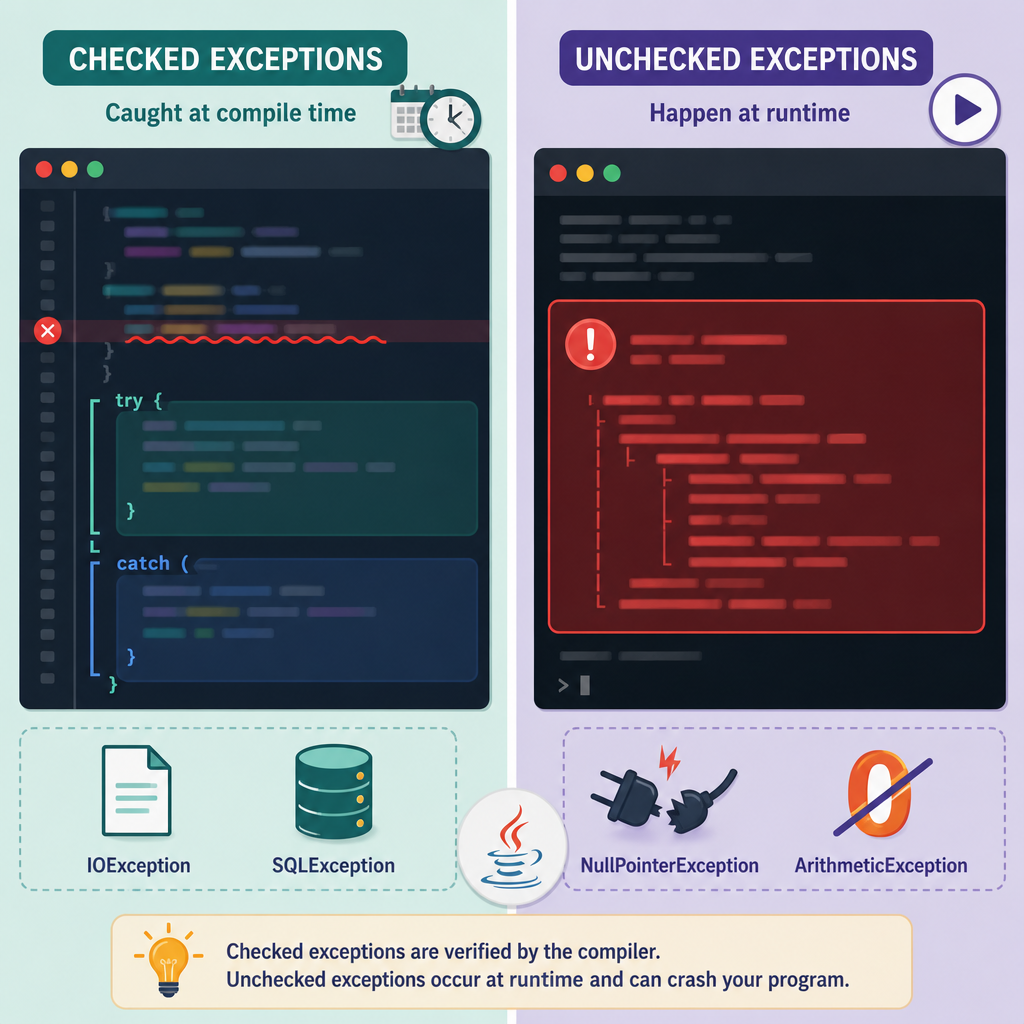
An exception is an object that represents an abnormal condition (for example, a missing file or a bad number format). When that condition happens, Java “throws” a Throwable. You can either handle it (with try/catch) or let it propagate to the caller. If nobody handles it, your program may terminate with a stack trace.
Checked vs Unchecked exceptions: the big picture
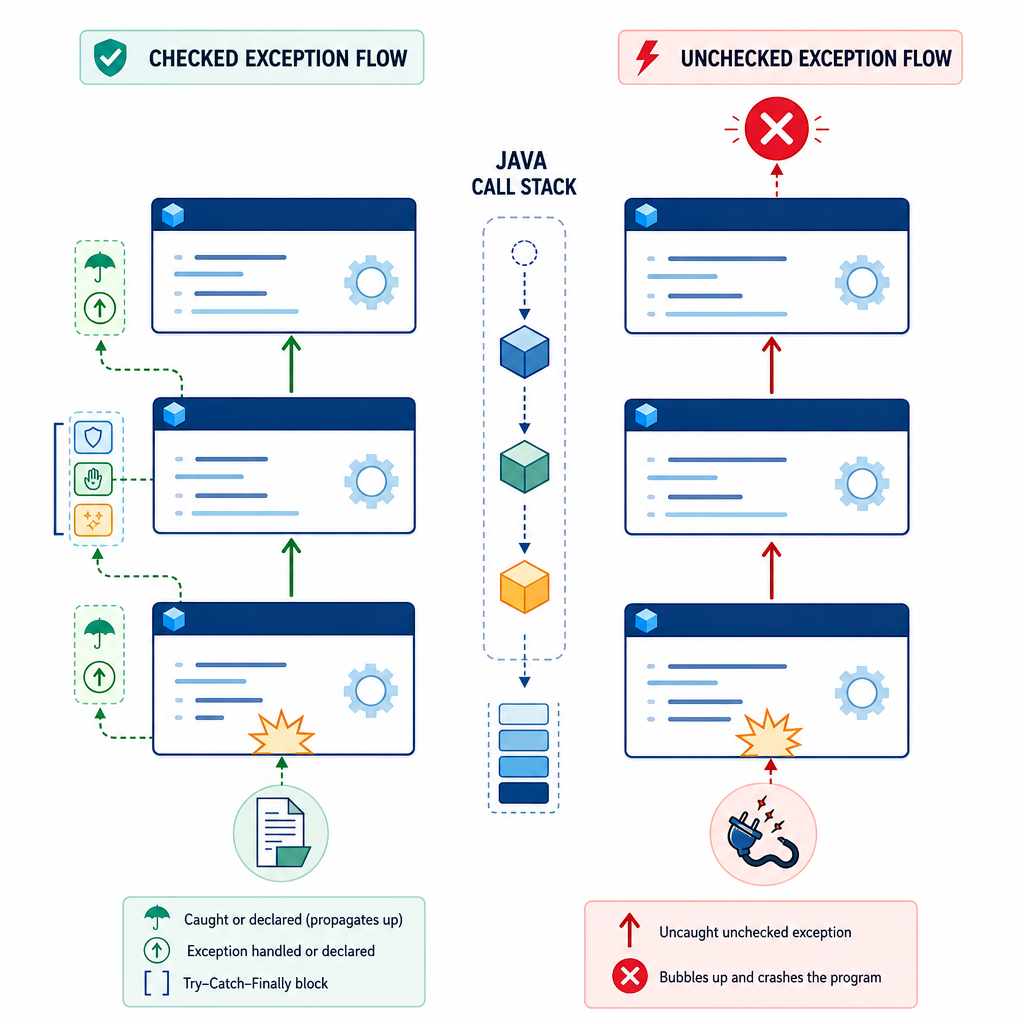
Java has two main categories:
- Checked exceptions: All subclasses of
ExceptionexceptRuntimeException. The compiler enforces that you either handle them or declare them. - Unchecked exceptions:
RuntimeExceptionandError(and all their subclasses). The compiler does not force you to catch or declare them.
This rule is called the “catch-or-specify” requirement for checked exceptions. It’s why code that does file or database I/O often includes try/catch or a throws clause.
What are checked exceptions in Java?
These represent problems your program can often recover from, like I/O failures. Examples include IOException and SQLException. The compiler requires that you either catch them or declare them with throws.
What are unchecked exceptions in Java?
These usually indicate programming errors or unexpected states, like NullPointerException, IllegalArgumentException, and ArrayIndexOutOfBoundsException. Error types (like OutOfMemoryError) are also unchecked and represent serious problems. You generally should not try to catch Error in normal code.
Difference between checked and unchecked exceptions in Java
| Aspect | Checked Exceptions | Unchecked Exceptions |
|---|---|---|
| Type | Subclasses of Exception (excluding RuntimeException) |
RuntimeException and Error (and their subclasses) |
| Compiler rule | Must be caught or declared with throws |
No catch-or-specify requirement |
| Typical use | Recoverable conditions (I/O, database, network) | Programming errors or invalid states (bugs, bad args) |
| Handling style | Handle locally or propagate with context | Prevent via validation; handle centrally if needed |
| Examples | IOException, SQLException, ParseException |
NullPointerException, IllegalArgumentException, ArrayIndexOutOfBoundsException, Error |
Java exception handling basics for beginners
At minimum, you need to know how to use try, catch, and finally, how to declare exceptions using throws, and how to apply newer features like try-with-resources and multi-catch.
try-catch-finally example in Java
Use try for code that may fail, catch to handle the failure, and finally for cleanup that should run whether or not an exception happened.
class="cd-package">import java.io.BufferedReader;
class="cd-package">import java.io.FileReader;
class="cd-package">import java.io.IOException;

class="cd-keyword cd-access">public class TryCatchFinallyDemo {
    class="cd-keyword cd-access">public static void main(String[] args) {
        BufferedReader reader = null;
        try {
            // This will throw if input.txt does not exist (checked exception)
            reader = new BufferedReader(new FileReader("input.txt"));
            String firstLine = reader.readLine();
            System.out.println("First line: " + firstLine);
        } catch (IOException e) {
            System.out.println("Handled checked exception: " + e.getClass().getSimpleName());
        } finally {
            // Cleanup runs whether or not an exception occurred
            if (reader != null) {
                try {
                    reader.close();
                    System.out.println("Reader closed in finally.");
                } catch (IOException closeEx) {
                    System.out.println("Failed to close reader: " + closeEx.getMessage());
                }
            }
        }
    }
}Handled checked exception: FileNotFoundExceptionDeclaring (propagating) a checked exception with throws
Instead of catching a checked exception where it occurs, you can declare it and let the caller decide.
class="cd-package">import java.io.IOException;
class="cd-package">import java.nio.file.Files;
class="cd-package">import java.nio.file.Path;

class="cd-keyword cd-access">public class ThrowsDemo {
    // Caller must handle or declare IOException
    static void saveText(String path, String text) throws IOException {
        Files.writeString(Path.of(path), text);
    }

    class="cd-keyword cd-access">public static void main(String[] args) {
        try {
            saveText("hello.txt", "Hello, CodDesire!");
            System.out.println("Saved file successfully.");
        } catch (IOException e) {
            System.out.println("Could not save file: " + e.getMessage());
        }
    }
}
Try-with-resources: safer I/O without manual close
Since Java 7, try-with-resources closes files, streams, and other AutoCloseable resources automatically, even when exceptions occur. It also preserves secondary failures as suppressed exceptions retrievable with getSuppressed() so you don’t lose important error details.
class="cd-package">import java.io.BufferedReader;
class="cd-package">import java.io.IOException;
class="cd-package">import java.nio.file.Files;
class="cd-package">import java.nio.file.Path;

class="cd-keyword cd-access">public class TryWithResourcesDemo {
    class="cd-keyword cd-access">public static void main(String[] args) {
        try (BufferedReader br = Files.newBufferedReader(Path.of("input.txt"))) {
            String line = br.readLine();
            System.out.println("First line: " + line);
        } catch (IOException e) {
            System.out.println("I/O failed: " + e.getMessage());
            // Any close() failures are suppressed and kept here:
            for (Throwable t : e.getSuppressed()) {
                System.out.println("Suppressed: " + t);
            }
        }
    }
}
Multi-catch to reduce repetition
Catch several related exception types in one block using |. Keep your handler specific and meaningful.
class="cd-keyword cd-access">public class MultiCatchDemo {
    class="cd-keyword cd-access">public static void main(String[] args) {
        String input = "0"; // Try ___CDPHSTR1___ to trigger NumberFormatException
        try {
            int n = Integer.parseInt(input);
            int result = 10 / n; // Triggers ArithmeticException when n == 0
            System.out.println("Result = " + result);
        } catch (NumberFormatException | ArithmeticException ex) {
            System.out.println("Problem: " + ex.getClass().getSimpleName());
        }
    }
}
Common unchecked exceptions in Java with examples
Unchecked exceptions usually mean something’s wrong in your program logic. Prevent them when possible, and handle them centrally (for example, at application boundaries).
NullPointerException (NPE)
class="cd-keyword cd-access">public class NullPointerDemo {
    static int length(String s) {
        return s.length(); // NPE if s is null
    }

    class="cd-keyword cd-access">public static void main(String[] args) {
        try {
            System.out.println(length(null));
        } catch (NullPointerException e) {
            System.out.println("Caught NPE");
        }
    }
}
Prevent NPE with validation
class="cd-package">import java.util.Objects;

class="cd-keyword cd-access">public class RequireNonNullDemo {
    static int length(String s) {
        Objects.requireNonNull(s, "name must not be null");
        return s.length();
    }

    class="cd-keyword cd-access">public static void main(String[] args) {
        try {
            length(null);
        } catch (NullPointerException e) {
            System.out.println(e.getMessage()); // ___CDPHSTR1___
        }
    }
}
IllegalArgumentException for bad inputs
class="cd-keyword cd-access">public class IllegalArgumentDemo {
    static void setAge(int age) {
        if (age < 0) {
            throw new IllegalArgumentException("age must be non-negative");
        }
        // set the age...
    }

    class="cd-keyword cd-access">public static void main(String[] args) {
        try {
            setAge(-5);
        } catch (IllegalArgumentException e) {
            System.out.println(e.getMessage());
        }
    }
}
Modern Java: streams, wrappers, and async exceptions
Modern features change how we deal with exceptions in everyday code.
Wrapping I/O in streams with UncheckedIOException
Inside lambdas and streams, throwing a checked exception directly is not allowed. Wrap it in UncheckedIOException and handle it outside.
class="cd-package">import java.io.IOException;
class="cd-package">import java.io.UncheckedIOException;
class="cd-package">import java.nio.file.Files;
class="cd-package">import java.nio.file.Path;
class="cd-package">import java.util.List;

class="cd-keyword cd-access">public class UncheckedIODemo {
    class="cd-keyword cd-access">public static void main(String[] args) {
        List<Path> files = List.of(Path.of("a.txt"), Path.of("b.txt"));

        try {
            long totalSize = files.stream()
                .mapToLong(p -> {
                    try {
                        return Files.size(p); // checked
                    } catch (IOException e) {
                        throw new UncheckedIOException(e);
                    }
                })
                .sum();
            System.out.println("Total size: " + totalSize);
        } catch (UncheckedIOException e) {
            System.out.println("I/O failed, cause: " + e.getCause());
        }
    }
}
Async errors with CompletableFuture
With CompletableFuture, failures are wrapped in the unchecked CompletionException. When you call join(), catch CompletionException and inspect getCause().
class="cd-package">import java.util.concurrent.CompletableFuture;
class="cd-package">import java.util.concurrent.CompletionException;

class="cd-keyword cd-access">public class CompletableFutureDemo {
    class="cd-keyword cd-access">public static void main(String[] args) {
        CompletableFuture<String> future = CompletableFuture.supplyAsync(() -> {
            // Simulate failure
            throw new IllegalStateException("boom");
        });

        try {
            String value = future.join(); // throws CompletionException on failure
            System.out.println(value);
        } catch (CompletionException e) {
            System.out.println("Async failed, cause: " + e.getCause());
        }
    }
}
When to use checked vs unchecked exceptions (simple explanation)
- Use checked exceptions for problems the caller can meaningfully recover from (e.g., a missing file path the user can fix). Good examples:
IOException,SQLException. - Use unchecked exceptions for programming errors or illegal states that indicate bugs (e.g., null where not allowed, invalid arguments). Good examples:
NullPointerException,IllegalArgumentException. - Avoid catching Error types (like
OutOfMemoryError); they signal serious problems and are not meant for normal handling. - Prefer try-with-resources for I/O to avoid leaks and keep error information via suppressed exceptions.
- In layered apps, let low-level code throw checked exceptions, then either handle them or translate them to unchecked at the boundaries for simpler higher-level code.
Beginner decision flow: choose checked or unchecked
IOException, SQLException. Use try/catch or add throws.RuntimeException types (IllegalArgumentException, IllegalStateException), validate inputs early.- Prefer try-with-resources for files/streams.
- Don’t catch
Errorin normal code. - Log or wrap with context; avoid empty catches.
Creating custom checked or unchecked exceptions
Custom exceptions make your intent clear. Choose checked or unchecked based on whether callers are expected to recover.
// Checked: callers must handle or declare
class="cd-keyword cd-access">public class FileFormatException extends Exception {
    class="cd-keyword cd-access">public FileFormatException(String message) { super(message); }
    class="cd-keyword cd-access">public FileFormatException(String message, Throwable cause) { super(message, cause); }
}

// Unchecked: use for programming errors or invalid states
class="cd-keyword cd-access">public class InvalidStateException extends RuntimeException {
    class="cd-keyword cd-access">public InvalidStateException(String message) { super(message); }
    class="cd-keyword cd-access">public InvalidStateException(String message, Throwable cause) { super(message, cause); }
}- Is recovery possible and expected by the caller? If yes, use a checked exception.
- Is it a programming error (bad argument, illegal state, NPE)? Use an unchecked exception + validation.
- For checked exceptions: decide per method to handle now (try/catch) or declare (
throws). - Use try-with-resources for I/O; inspect
getSuppressed()if needed. - Never swallow exceptions: log, add context, or rethrow.
- Avoid catching
Exceptionbroadly unless you rethrow or translate with care.
Common mistakes to avoid
- Swallowing exceptions: Don’t write empty
catchblocks. Always log, wrap, or rethrow with context. - Catching overly broad types: Avoid catching
Exceptionunless you rethrow or handle carefully. Prefer specific exceptions. - Using exceptions for normal control flow: Don’t rely on exceptions for ordinary logic (like loop exits). It’s slow and unclear.
- Forgetting to close resources: Use try-with-resources to avoid leaks and preserve suppressed exceptions.
- Catching
Error: Don’t catchErrorin normal code. Log only if you’re about to terminate.
Beginner guide recap: how to handle exceptions in Java step by step
- Identify if the method you call throws checked exceptions (read its docs or let your IDE show you).
- Decide to handle now (with
try/catch) or later (addthrowsto your method). For I/O, handling locally is often fine. - Use
try-with-resourcesfor files/streams so they close safely. - Write meaningful messages or wrap exceptions to give context.
- For unchecked exceptions, fix the underlying logic where possible; add validation like
Objects.requireNonNullor argument checks.
FAQ: People also ask
What is the difference between checked and unchecked exceptions in Java?
Checked exceptions (all Exception types except RuntimeException) must be caught or declared. Unchecked exceptions (RuntimeException and Error) do not have this compiler rule. Use checked for recoverable problems and unchecked for programming errors.
Why does Java use checked exceptions and when should I use them?
Checked exceptions encourage you to handle recoverable problems explicitly. Use them when the caller can reasonably fix the issue (like retrying, prompting for a new file path, or showing an error message).
Is RuntimeException checked or unchecked in Java?
RuntimeException is an unchecked exception. The compiler does not require you to catch or declare it.
How do I handle a checked exception with try-catch in Java?
Wrap the risky call in a try block and catch the specific checked exception type. Optionally add a finally block for cleanup or use try-with-resources. See the TryCatchFinallyDemo and TryWithResourcesDemo examples above.
Should I create custom checked or unchecked exceptions?
Create a checked exception when callers are expected to recover. Create an unchecked exception when it signals a programming error or invalid state. Keep names descriptive and include helpful messages.
Sources / Further reading
- Oracle: The Catch or Specify Requirement
- Oracle: The try-with-resources Statement
- JLS §11: Exceptions
- Exception (Java SE 21) API
- RuntimeException (Java SE 21) API
- Error (Java SE 23) API
- Throwable (Java SE 22) API
- CompletableFuture (Java SE 21) API
That’s the simple explanation of checked vs unchecked exceptions in Java. Keep practicing with small programs, and as you grow, you’ll learn where to catch, where to declare, and when to prefer checked or unchecked exceptions for clean, maintainable code. For more Java checked and unchecked exceptions explained for beginners content, continue learning in the CodDesire Java section.