
AI agents for small businesses have moved from hype to hands-on. In 2026, managed agent platforms and mature SDKs made everyday tasks—support tickets, lead qualification, bookings, and back-office workflows—automatable in weeks, not months. This starter playbook gives students, beginners, creators, bloggers, developers, and small business owners a clear path: what AI agents are, where they shine, the best beginner tools, and a step-by-step setup you can follow today.
What is an AI agent for a small business?

An AI agent is a software teammate that uses a modern AI model plus tools to perform a goal-driven task. Unlike a basic chatbot that only replies to messages, an agent can read your files, search the web, call APIs (like your CRM or calendar), and even operate a browser or desktop to complete a workflow—under your guardrails.
How AI agents work (in plain English)
- They understand intent: The model interprets what the user wants.
- They plan steps: The agent decides which tools and data to use.
- They act with tools: Examples include file search, code execution, calling your business APIs, or “computer use” to navigate websites and apps.
- They check results: The agent reviews intermediate outputs and continues until it achieves a defined goal or requests human help.
AI agents vs chatbots for small businesses
- Chatbot: Conversation-only; answers FAQs from a static script or knowledge base.
- AI Agent: Conversation plus action; can look up order status, create invoices, book appointments, update CRM records, or draft and file documents—then confirm with a user or route to a human.
Quick comparison: Chatbots vs AI agents for small businesses
| Feature | Chatbot | AI Agent |
|---|---|---|
| Primary capability | Answers FAQs | Answers and takes action |
| Data grounding | Static scripts/KB | Retrieval over docs + business systems |
| Tools & integrations | Limited | MCP/native connectors, API calls, computer use |
| Workflow style | Single-turn replies | Multi-step plans with tool calls |
| Human handoff | Basic transfer | Structured handoff with transcript/approvals |
| Best first use | FAQ deflection | Support + status lookups, booking, CRM updates |
| Setup effort | Low | Moderate (connectors, guardrails) |
| Governance | Minimal | Guardrails, approvals, logging |
High-ROI use cases you can launch first
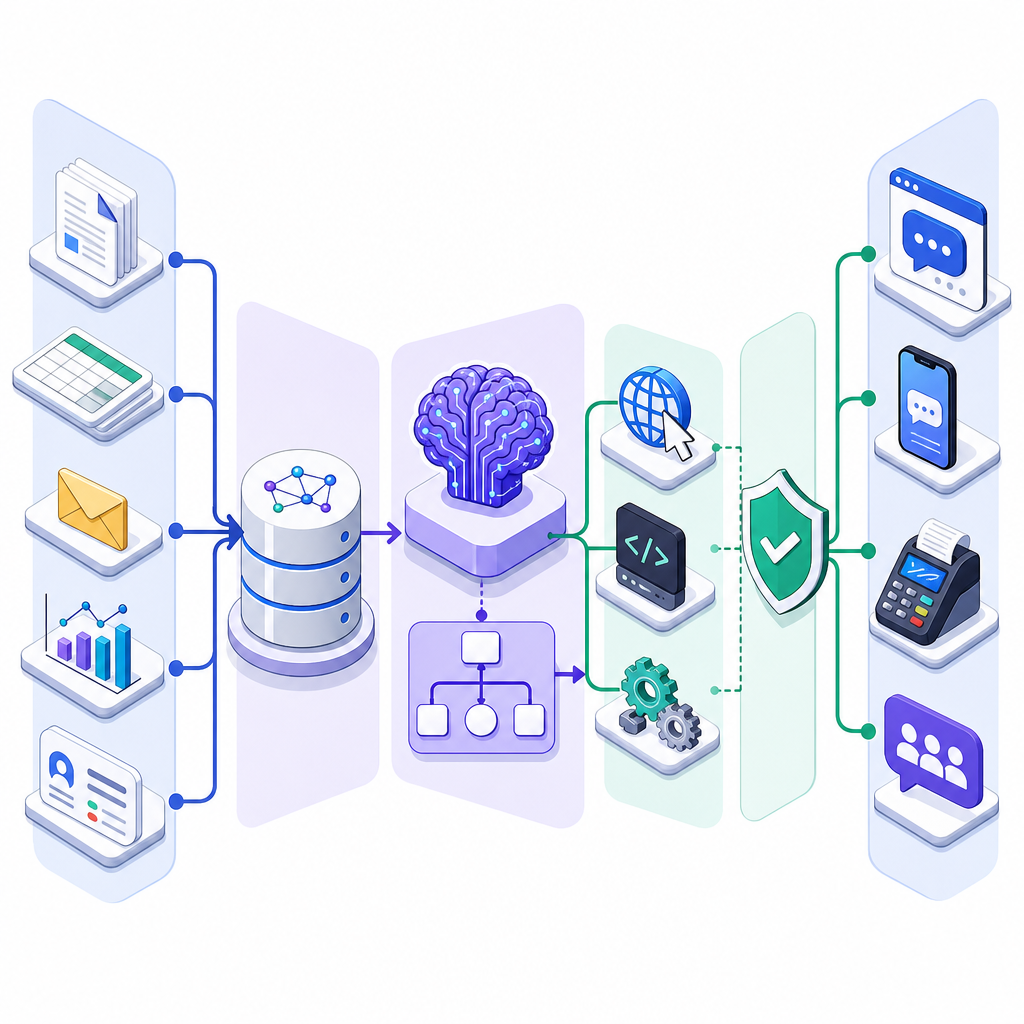
Here are practical AI agent use cases for small business teams, creators, bloggers, and startups. Start focused; pick one task, one channel, and one KPI.
- Customer support deflection: Answer common questions, pull order status, process simple returns, and escalate edge cases with a clean transcript. Human handoff stays available. (See “how to use AI agents for customer support” below.)
- Lead capture and qualification: Greet website visitors, ask qualifying questions, verify contact details, score intent, and book a demo slot.
- Appointment booking: Check staff calendars, propose times, confirm via email/SMS, and create calendar invites.
- Invoice, receipt, and document extraction: Ingest PDFs or images, extract fields, validate totals, and push data to accounting tools.
- CRM and email updates: Log calls, summarize notes, update deal stages, and draft follow-ups for review.
- Inventory and order status: Read data from ERP or eCommerce platforms and answer status queries.
- Ops analyst tasks (RAG over files): Search policies, SOPs, or product docs; return precise answers with citations.
- Marketing drafts with approvals: Create blog outlines, social captions, and product copy; route to a human for final approval.
- For creators and bloggers: Repurpose long-form posts into newsletters and shorts; tag content; prepare affiliate link roundups with source credits. This is where AI agents for creators and bloggers can save hours weekly.
Choosing a beginner-friendly agent stack
The best AI agent tools for beginners balance stability, guardrails, and easy connectors. In 2026, these options are popular and practical:
OpenAI Responses API (recommended path vs. deprecated Assistants)
- Why it’s solid for SMBs: Managed tools (Code Interpreter, File Search), Model Context Protocol (MCP) connectors, and “computer use” for web/desktop automation.
- Important: The legacy Assistants API is deprecated and removed in August 2026; build new agents with the Responses API. See OpenAI’s announcement in the Sources below.
Google Gemini Agents and Antigravity Agent
- Gemini Agents give you agent behaviors with retrieval, tools, and grounding.
- Antigravity Agent (Interactions API) offers managed agent experiences and “computer use” to control a browser/desktop with human approvals.
AWS Bedrock AgentCore
- Modern agent foundation with tracing, guardrails, and enterprise integrations.
- Note: Bedrock Agents Classic is stopping new sign-ups on July 30, 2026; use AgentCore going forward.
Microsoft Copilot Studio / Agent Framework 1.0
- Good for Microsoft 365, Teams, Entra ID (IAM), and Purview data governance environments.
- Low-code builders plus enterprise controls make rollout easier for IT.
Tip: If you’re a solo builder or small team, start with one managed platform. If you’re already invested in Google Cloud, Azure, or AWS, choose the agent option native to your cloud for simpler security and deployment.
Step-by-step AI agent setup for small business (no-code to low-code)
This step-by-step AI agent setup for small business works across vendors with small variations. It’s a practical beginner guide to AI agents you can finish in a weekend.
1) Pick one narrow task and KPI
- Examples: “Resolve shipping FAQs and show order status” or “Qualify leads and book 15-minute intros.”
- Define success: deflect 30% of repetitive tickets; book 5 qualified calls/week; keep response time under 5 seconds.
2) Ground the agent on your data
- Upload policies, product sheets, and FAQs into a managed knowledge base/File Search.
- Organize by topic; include canonical answers; avoid outdated copies.
- Enable retrieval with citations so staff can audit answers.
3) Connect tools and APIs
- Use MCP connectors or native integrations to link your CRM, calendar, help desk, eCommerce, and email.
- Limit permissions to only what the agent needs (principle of least privilege).
4) Add guardrails and policies
- System instructions: define scope, tone, and when to escalate to a human.
- Approvals: require human confirmation for refunds, sending emails at scale, or “computer use” actions that modify data.
- Safety filters: enable content filtering and data loss prevention (DLP) where available.
5) Test in a sandbox
- Create test conversations that cover known intents and edge cases.
- Measure latency, accuracy of tool calls, and citation quality.
- Iterate prompts and permissions before going live.
6) Ship one pilot channel
- Start with a website chat widget, Slack/Teams app, or voice/SIP line—just one.
- Set up clear handoff: “Type ‘agent’ to return; type ‘human’ for a person.”
7) Observe, learn, and expand
- Use built-in tracing/analytics to see where the agent hesitates or loops.
- Add new intents and tools only after the core KPI is met for two weeks.
- Then expand to a second channel or adjacent task (e.g., from support FAQs to returns initiation).
Example pilot: how to use AI agents for customer support
- Data: Upload shipping, returns, and warranty policies; link to your order management system.
- Tools: Connect order lookup (read-only), return initiation (approval required), and email reply draft (approval required).
- Guardrails: Never process refunds > $50 without approval; always provide a policy citation for eligibility decisions.
- Handoff: If an order can’t be found after two attempts, escalate to a human with a transcript and context.
- KPI: 30–50% deflection on repetitive tickets; < 5 minutes time-to-resolution for simple cases.
Tools and capabilities to know
MCP connectors (Model Context Protocol)
- Open, multi-vendor protocol that standardizes how agents discover and use tools, data sources, and skills.
- Benefit: Faster integrations, less custom glue code, and easier migrations later.
“Computer use” (browser/desktop control)
- Lets an agent operate web apps or a desktop to complete tasks you haven’t integrated yet.
- Always add approvals and logging; keep sessions scoped to test or staging where possible before production.
Retrieval and File Search (RAG)
- Index your PDFs, docs, and spreadsheets; the agent cites the source it used.
- Keep content fresh and remove obsolete files to reduce hallucinations.
Built-in tools and channels
- Code execution for spreadsheets or quick transforms.
- Web search to verify facts—use sparingly and require citations.
- Channels: web chat, Slack/Teams, email, voice/SIP. Start with one.
Governance, security, and data controls
- Identity and access: Use cloud IAM/Entra roles; give the agent a dedicated service identity with least privilege.
- Encryption: Enable at rest and in transit; where supported, use customer-managed keys (CMK/KMS).
- Data policies: Configure content filters and DLP; apply governance like Microsoft Purview when in Microsoft stacks.
- OpenAI data controls: Review data retention and safety monitoring settings (e.g., Zero Data Retention, Modified Abuse Monitoring) per endpoint and plan. Not all endpoints behave the same—configure intentionally.
- Healthcare note: HIPAA eligibility depends on specific endpoints plus executed agreements (e.g., BAA/Healthcare Addendum). Using a HIPAA-eligible endpoint alone does not make you compliant.
- Scoped system instructions with clear escalation to a human
- Knowledge base uploaded, deduplicated, and dated; retrieval returns citations
- Read-only access for lookups; approvals required for any write/change actions
- Dedicated service identity with least-privilege roles and audit logging
- Safety filters and DLP configured per channel; sensitive data redaction where available
- Tracing/observability enabled; sample conversations recorded for QA
- Human handoff tested in each channel (web, chat, voice) with a clear path back
- Small eval set covering intents, retrieval accuracy, and tool-call correctness
- Usage and cost alerts in place; per-channel token dashboards reviewed weekly
- Rollback plan and kill switch documented and accessible to owners
Observability and quality assurance
- Tracing: Use vendor traces (e.g., Bedrock tracing) or third-party tools like LangSmith to inspect steps, tool calls, and latencies.
- Evals: Build small evaluation sets for intent coverage, retrieval accuracy, tool-call correctness, latency, and safety.
- Human-in-the-loop: Require human review for high-risk or high-impact actions and for ambiguous intents.
- Feedback loops: Add “thumbs up/down” and a “send to human” option in every channel.
Cost control for affordable AI agents for small businesses
- Choose right-sized models: Use fast/mini/“Flash” tiers for most turns; reserve larger models for complex tasks.
- Trim context: Keep prompts lean; ground with only the most relevant chunks.
- Prompt caching: Enable caching where available to cut repeated token costs.
- Constrain tool loops: Set max tool-call depth and graceful fallbacks to a human.
- Monitor usage: Track per-channel token spend and guardrail costs; kill features that don’t move KPIs.
- Roll out in phases: Start with one channel before expanding to email/voice.
Limitations and when to involve a human
- Agents can misinterpret edge cases; keep humans available and visible in every flow.
- Do not allow unsupervised high-risk actions (financial transfers, privacy-sensitive operations) without approvals.
- Content freshness matters: outdated files cause wrong answers; schedule periodic re-indexing.
- Latency trade-offs: Tool calls and retrieval add time; optimize for the user experience.
Future scope: what’s coming next
- MCP 2026-07-28 spec advances: cleaner task semantics and stateless cores that simplify scaling.
- Managed multi-agent collaboration: specialized agents (support, ops, sales) coordinating safely under one roof.
- Safer “computer use” at scale: richer approvals and observability to automate more desktop/web processes.
- Domain toolkits and templates: payments, healthcare, retail, and logistics modules shipping in mainstream clouds.
Quick FAQ
What is an AI agent and how does it work for a small business?
It’s a goal-driven assistant that can converse and act. It grounds itself on your business data, calls tools and APIs, and follows guardrails to complete tasks like answering support questions, booking, or updating your CRM—escalating to a human when needed.
Which AI agent tools are easiest for beginners to start with?
Beginner-friendly choices include the OpenAI Responses API with managed tools, Google’s Gemini Agents/Antigravity for guided experiences and “computer use,” Microsoft Copilot Studio in Microsoft ecosystems, and AWS Bedrock AgentCore for AWS shops. Pick one aligned with your stack.
How do I set up my first AI agent without coding?
Use a managed agent builder: upload your FAQs and docs, enable File Search, connect one tool (like calendar or order lookup) via a connector, add simple rules and approvals, test in a sandbox, then publish to one channel (e.g., web chat). Expand only after you hit your KPI.
What are practical AI agent use cases for a small shop or startup?
Customer support deflection with human handoff, lead capture and qualification with booking, document extraction to accounting, status lookups for orders/inventory, and drafting marketing copy with approvals.
How much do AI agents cost for small businesses?
Costs vary by model size, traffic, and tools. Keep it affordable by using smaller models for most turns, caching prompts, limiting tool loops, and starting with a single channel. Monitor usage weekly and scale up only when KPIs justify it.
AI agents vs chatbots for small businesses: a quick recap
- Chatbots answer; agents answer and act.
- Agents integrate with your systems via MCP/native connectors and can perform multi-step workflows.
- For critical tasks, keep approvals and human review in place.
Best AI agent tools for beginners: short list
- OpenAI Responses API: modern agent features, MCP connectors, File Search, and “computer use.”
- Google Gemini Agents and Antigravity Agent: managed flows and strong “computer use.”
- Microsoft Copilot Studio/Agent Framework 1.0: low-code builder with Microsoft 365/Teams integrations.
- AWS Bedrock AgentCore: observability and enterprise-grade controls within AWS.
Putting it all together: your 2-week starter plan
- Week 1, Day 1–2: Choose one use case and KPI. Draft system instructions.
- Day 3–4: Upload and index your FAQs/policies; fix outdated content.
- Day 5: Connect one tool (e.g., order lookup or calendar) via MCP/native connector.
- Week 2, Day 1: Add guardrails and approvals. Create 20 test conversations.
- Day 2–3: Sandbox testing; measure latency and accuracy; iterate prompts.
- Day 4: Launch to one channel with clear human handoff.
- Day 5: Review analytics; ship one improvement. Repeat weekly.
Need help?
If you want hands-on help selecting tools or designing safe guardrails, explore more in our Technology area and get in touch: CodDesire Technology.
Sources / Further reading
- OpenAI: New tools for building agents (Responses API) — openai.com/index/new-tools-for-building-agents/
- OpenAI: New tools and features in the Responses API (MCP, Code Interpreter, File Search) — openai.com/index/new-tools-and-features-in-the-responses-api/
- Assistants API deprecation and August 2026 removal — help.openai.com/en/articles/8550641
- OpenAI HIPAA‑Eligible Endpoints (July 9, 2026) — cdn.openai.com/osa/hipaa-endpoints.pdf
- Data controls in the OpenAI platform (ZDR/Modified Abuse Monitoring) — platform.openai.com/docs/models/default-usage-policies-by-endpoint
- Gemini API — Agents overview — ai.google.dev/gemini-api/docs/agents
- Antigravity Agent (managed agents via Interactions API) — ai.google.dev/gemini-api/docs/antigravity-agent
- Gemini API — Computer Use — ai.google.dev/gemini-api/docs/computer-use
With the right tools and guardrails, AI agents for small businesses can deliver real outcomes fast—without heavy coding or big budgets. Start small, measure, and iterate.