
Building a simple web application with Python and Flask is a rewarding and accessible project for students, bloggers, small business owners, and developers just starting in web app development. Flask is a lightweight and flexible Python web framework that makes creating web applications straightforward without unnecessary complexity. This step-by-step guide will introduce you to Flask, guiding you through setting up your first web app, understanding core concepts, and sharing practical tips to help you build and extend your application.
What is Flask and Why Use It?

Flask is a popular python web framework known for its simplicity and minimalism. Unlike larger frameworks, Flask gives you the essentials to get started quickly while allowing you to choose the additional components you need. It handles routing, request processing, and template rendering efficiently, making it ideal for beginners and those wanting a lightweight tool for web app development.
As of 2026, the latest Flask versions (Flask 3.1.3) offer improved asynchronous support, enhanced blueprint management, and tighter integration with databases like SQLAlchemy 2.0. This means Flask is not only beginner-friendly but also supports building modern, efficient web applications.
Flask is a minimal and flexible Python web framework designed to help developers quickly build scalable web applications with control over components and simplicity. Its latest features empower even beginners to create powerful apps incorporating modern asynchronous and database functionalities.
Getting Started: Setting Up Your Environment
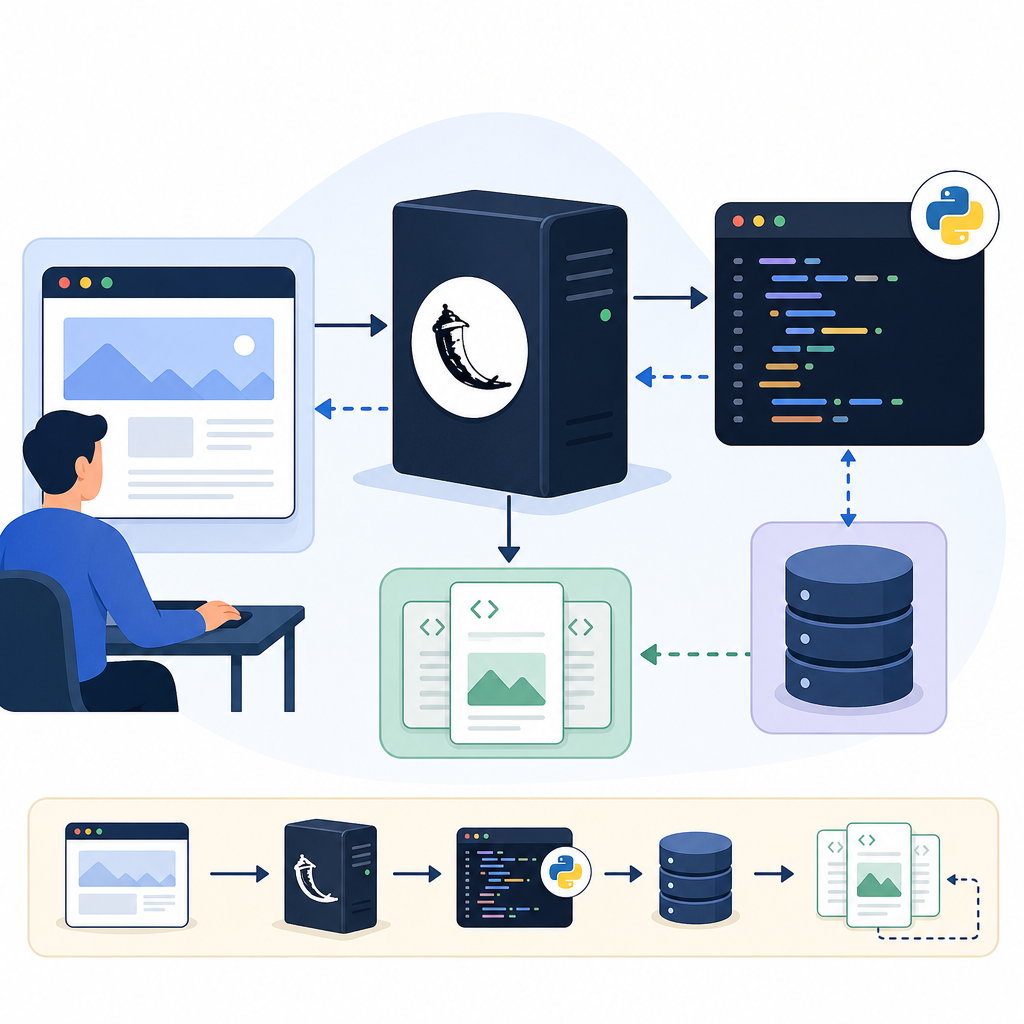
Before starting, ensure you have Python installed (Python 3.9 or newer is recommended). Follow these steps to prepare your environment:
- Create a virtual environment: This helps manage dependencies without affecting your system Python.
python -m venv venv source venv/bin/activate # On Windows use: venv\Scripts\activate - Install Flask:
pip install flask - Verify installation: Run
python -m flask --versionto confirm Flask is installed properly.
pip install flask
Define routes & views
python app.py
http://127.0.0.1:5000/
Your First Flask App: A Simple Hello World
Let’s write a basic Flask app to get familiar with the structure. Create a Python file called app.py and paste the following:
from flask import Flask

app = Flask(__name__)

@app.route("/")
def hello():
    return "Hello, Flask!"

if __name__ == "__main__":
    app.run(debug=True)
Here’s what happens:
Flask(__name__)creates the Flask application instance.@app.route("/")sets up the home page URL route.- The
hello()function returns a simple greeting when visiting the root URL. app.run(debug=True)starts a local development server with debugging enabled for easier testing.
Run the app with python app.py and visit http://127.0.0.1:5000/ in your browser to see the message.
Understanding Flask Routing and Templates
Routing directs URLs to Python functions, defining how users interact with your app. You can add more routes as needed:
@app.route("/about")
def about():
    return "This is the About page."
For dynamic content, Flask uses templates powered by the Jinja2 engine. Create a folder named templates and add an HTML file index.html:
<!DOCTYPE html>
<html>
<head>
    <title>Welcome</title>
</head>
<body>
    <h1>Hello, {{ name }}!</h1>
</body>
</html>
Modify your route to render this template with a variable:
from flask import render_template

@app.route("/")
def home():
    return render_template("index.html", name="CodDesire User")
This makes your web page dynamic and easier to maintain.
Building a Basic Form and Handling Input
Web applications often require user input. Let’s add a simple form to collect a user’s name:
<form method="POST" action="/greet">
    <input type="text" name="username" placeholder="Enter your name">
    <input type="submit" value="Greet Me">
</form>
Add a route to handle the form submission:
from flask import request

@app.route("/greet", methods=["POST"])
def greet():
    username = request.form.get("username", "Guest")
    return f"Hello, {username}! Welcome to your Flask app."
This introduces POST methods and form data handling in Flask.
- Create and activate a virtual environment
- Install Flask using
pip install flask - Write your Flask app script with route definitions
- Test your app locally by running
python app.py - Add dynamic templates inside the
templates/folder - Implement forms to handle user input if needed
- Organize code with blueprints as your app scales
- Turn off debug mode before deploying to production
Practical Tips for Flask Beginners
- Use Blueprints: As your app grows, organize it with blueprints to separate different features logically.
- Debug Mode: Keep debug mode
Trueduring development for error details but turn it off in production. - Virtual Environments: Always use virtual environments to manage project dependencies cleanly.
- Database Integration: Flask integrates well with SQLAlchemy for database work. This is a great next step after your basic app.
- Explore Extensions: Flask offers many extensions for authentication, API building, and more.
Flask vs Other Python Web Frameworks
| Framework | Complexity | Use Case | Flexibility | Learning Curve |
|---|---|---|---|---|
| Flask | Low | Small to medium apps, APIs | High – choose your components | Beginner Friendly |
| Django | High | Large, full-featured apps | Less flexible (batteries included) | Intermediate |
| FastAPI | Moderate | APIs with async support | Moderate – focused on APIs | Intermediate |
Flask and AI Integration: The Future of Web Apps
With Flask’s evolving support, you can now build intelligent web apps by integrating AI and machine learning models. Frameworks like Flama provide streamlined development and deployment of AI-powered APIs and services within Flask projects. This opens exciting possibilities to create predictive and interactive applications right from your Flask apps.
FAQs
What is Flask used for in Python?
Flask is used to build web applications and APIs in Python by providing essential tools for routing, request handling, and rendering templates, offering flexibility and simplicity for developers.
How do I create a web application using Flask?
You create a web app by installing Flask, setting up routes to handle URLs, defining view functions to process requests, and optionally using templates to render HTML pages dynamically.
Is Flask good for beginners?
Yes, Flask is excellent for beginners due to its minimal setup, clear coding style, and extensive documentation, allowing new developers to quickly create functional web applications.
What are the basic steps to build a web app with Flask?
The basic steps include installing Flask, creating an app instance, setting up routes and view functions, running the development server, and optionally adding templates and forms for dynamic content.
Sources and further reading
- Flask Tutorial – GeeksforGeeks
- Flask Tutorial: Build and Test a Python Web App – CloudsPress
- Flask Python Tutorial: Build Your First App – Codezup
- Flama: Production-ready APIs and ML services
For more helpful programming resources and books on Python and web development, visit CodDesire.com Books. Also explore the power of AI integration with your Flask apps on NexusAI by CodDesire.