
AI is moving beyond chat and into action. If you’ve been wondering “what are AI agents” and how they can help you automate real work, this beginner-friendly guide will walk you through the simple definition, how they work, practical use cases, and safe ways to try them. Whether you’re a student, creator, blogger, developer, or small business owner, you’ll find clear examples, tips, and next steps. For more practical technology explainers, visit our Technology page.
What Are AI Agents? Simple Definition
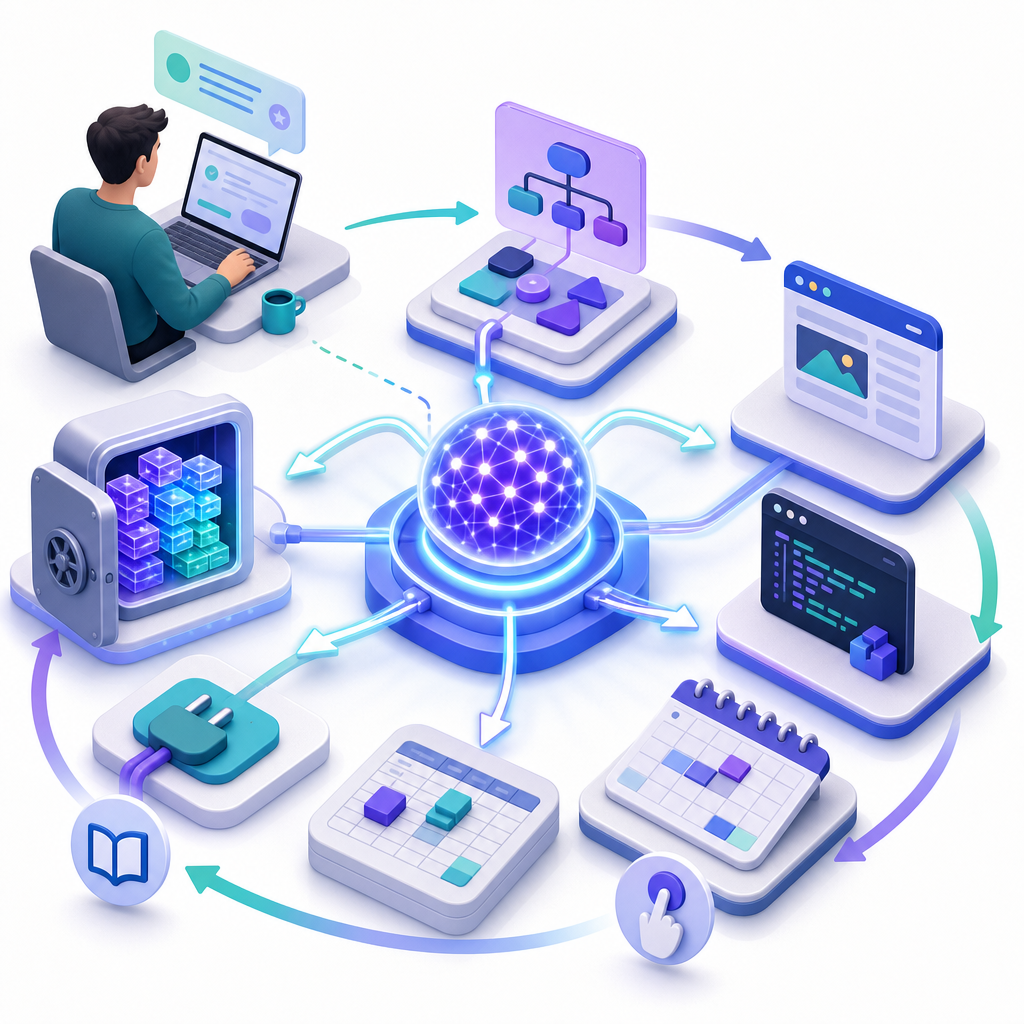
Short answer: An AI agent is software that uses a large language model (LLM) to understand a goal, plan steps, call tools or APIs, take actions (including clicking through apps), observe results, and repeat until the goal is met—under policies and guardrails.
AI agents explained in beginner terms
- Perceive: Read your request and available context (files, emails, tickets, web pages).
- Plan: Break the task into steps.
- Use tools: Call APIs, search the web or files, or even operate software interfaces (“computer use”).
- Act and check: Do an action, look at the outcome, and decide what to do next.
- Remember and learn: Use short-term “memory” in a thread; some setups add longer-term memory.
- Stay within rules: Follow permissions, approvals, and other safety policies.
How Do AI Agents Work? From Goal to Action

Modern autonomous AI workflows follow a loop. Here’s the typical flow, simplified:
- Goal and context: You give a clear objective (e.g., “Summarize this inbox and draft replies”). The agent reads relevant data.
- Reasoning and planning: The LLM proposes a plan (“Search inbox → categorize → draft → request approval”).
- Tool selection: The agent chooses tools it’s allowed to use: email API, file search, CRM API, or GUI automation.
- Action: It performs a step (e.g., read messages) and captures observations (message contents, API responses, screenshots).
- Feedback loop: It checks progress and either continues, asks for permission, or stops.
- Logging and review: Every step is traced so you can audit and improve.
Core building blocks you’ll hear about
- LLM engine: The model that plans and reasons.
- Tools and APIs: Connectors to email, calendars, knowledge bases, CRMs, ticket systems, databases, web/file search, and more.
- Computer use: When no clean API exists, some agents can safely control apps via the GUI with screenshots and cursor/keyboard actions. This is powerful but requires strict guardrails.
- Memory: Short-term thread memory; optional long-term memory via a vector database to recall past work or facts.
- Policies and permissions: Role-based access, approval gates, rate limits, spending caps, and allow-lists for tools.
- Observability: Tracing, step-by-step logs, and evaluations for quality, cost, and safety.
- Standards and connectors: The Model Context Protocol (MCP) emerged as a cross-vendor standard for connecting agents to tools and data, backed by the Agentic AI Foundation.
Where agents are maturing today (2025–2026)
- OpenAI: The newer Responses API adds built-in tools (web/file search, computer use) and support for MCP. The older Assistants API is deprecated with removal planned in August 2026.
- Anthropic: Claude’s “Computer Use” lets agents operate apps via the GUI with explicit safety controls.
- Microsoft: Copilot Studio supports “computer-using agents” that can navigate software, now generally available with enterprise guardrails.
- Google: Vertex AI Agent Builder provides a governed stack to ship agents with enterprise data and policies.
- AWS: Bedrock is transitioning from “Agents Classic” to the newer AgentCore; new builds should target AgentCore as Classic closes to new customers in 2026.
- NVIDIA, Salesforce, ServiceNow, UiPath: Offer agent runtimes, blueprints, and connectors for governed, observable deployments.
Takeaway: agents are moving from cool demos to production-grade workflows with approvals, monitoring, and cost control.
AI Agents vs. Chatbots: What’s the Difference?
| Aspect | Chatbots | AI agents |
|---|---|---|
| Primary goal | Converse and answer | Achieve an outcome (plan + act) |
| Typical actions | Provide text responses | Call tools/APIs, update systems, operate apps (with guardrails) |
| Tool and data access | Limited or none by default | Explicitly permissioned tools, scoped data, approvals |
| Works across apps | Rarely | Yes—via APIs, RAG, or GUI control when needed |
| Autonomy level | Responds in chat | Multi-step loops with checks and logs |
| Safety & governance | Basic content filters | Role-based access, allow-lists, approvals, spend limits, tracing |
| Best for | Q&A, drafting text | Executing workflows end to end (e.g., support, IT runbooks, ops) |
- Chatbots: Mostly answer questions or draft text. They stay in the conversation unless a human manually takes action elsewhere.
- AI agents: Go beyond chat. They plan, call tools/APIs, update systems, and can operate software interfaces—under permissions and policies.
- For beginners: Think “chatbot = talk.” “Agent = talk + do.”
Real-World AI Agent Examples and Use Cases
Here are practical ways teams use autonomous AI workflows right now:
Customer and employee support
- Ticket triage and resolution: Read tickets, match to KB articles, propose fixes, and draft replies. Escalate to a human on edge cases.
- Account updates: With approvals, make simple changes (reset a password, update shipping address) using helpdesk and CRM APIs.
IT and DevOps
- Service desk agent: Diagnose common issues (VPN, printer), run approved scripts, and open/close tickets with full logs.
- Runbook automation: Follow standard operating procedures: check logs, restart services, gather diagnostics, and report back.
Knowledge search and research
- RAG agents: Search internal documents, summarize findings, cite sources, and keep a thread memory for follow-ups.
- Web and file research: Use built-in web/file search to collect facts, compare options, and produce structured briefs.
Sales and marketing ops
- Lead enrichment: Given a list of domains, research company data, add to the CRM with references, and flag high-fit leads.
- Campaign support: Draft emails/posts, get approvals, schedule via a marketing platform, and produce a performance report.
Back-office automation
- Data extraction and reporting: Pull invoices from email, extract totals, validate against a policy, and post to accounting (with approvals).
- HR onboarding/offboarding: Create accounts, assign permissions, schedule training, and document steps in a log.
Developers and creators
- Coding agents: Propose edits, open PRs, write tests, and follow team policies. Keep humans in the loop for merge approvals.
- Content pipelines: Turn transcripts into posts, check style, add metadata, schedule drafts, and request final review before publishing.
How to Build a Basic AI Agent Step by Step (Beginner-Friendly)
No-code or low-code path
- Pick one narrow goal: “Summarize daily Slack messages into a task list” is better than “automate my company.”
- Choose a platform: Consider Microsoft Copilot Studio, Salesforce Agentforce, ServiceNow AI Agents, UiPath Agents, or a workflow tool that supports agent steps.
- Connect data and tools safely: Start with read-only access. Use service accounts with least privilege.
- Design the loop: Define when the agent runs (schedule, trigger), what it can do (tools), and when it must ask for approval.
- Pilot in a sandbox: Test on dummy data. Enable detailed logs and step-by-step traces.
- Add checks: Human-in-the-loop approvals for risky actions. Spending caps and rate limits. Blocklist sensitive actions.
- Measure: Track accuracy, time saved, errors, and user satisfaction. Iterate on prompts and policies.
- Roll out gradually: Expand scope only after the narrow use case is stable and cost-effective.
Developer path (brief)
- Pick an agent runtime: For example, OpenAI’s Responses API with built-in tools and MCP support, Anthropic’s tool use and computer use, or cloud platforms like Google Vertex AI Agent Builder or AWS Bedrock AgentCore.
- Define tools: Register functions/APIs with clear schemas; keep a permissioned tool registry. Prefer API-first; use computer-use only when necessary and safe.
- Implement the loop: Plan → pick a tool → act → observe → decide next step. Persist thread state to a database.
- Memory and retrieval: Add RAG for organization-specific knowledge; restrict sources to approved repositories.
- Observability: Add tracing, step logs, metrics, and evaluations (quality, safety, cost). Alert on anomalies.
- Guardrails: Least-privilege API keys, allow-lists, rate limits, approval gates, content filters, and sandboxed environments.
- Governance: Follow frameworks like NIST AI RMF and reference OWASP LLM Top 10 risks. Document data handling and access.
- Define the outcome and stop conditions in one sentence (what success looks like).
- Start read-only; add write access only after reviews and with approvals.
- Allow-list specific tools/APIs and domains. Block everything else by default.
- Set spend and step limits per run. Alert on unusual cost or long loops.
- Log every step (inputs, tool calls, outputs). Keep an audit trail.
- Require human approval to send external emails, change records, or move money.
- Test against prompt-injection with untrusted inputs (web pages, emails).
- Measure: accuracy, time saved, error rate, and user satisfaction before scaling.
Benefits of AI Agents
- Time savings: Offload repetitive, multi-step tasks.
- Consistency: Follow the same policy every time, with logs for review.
- Tool integration: Orchestrate many apps and APIs from one place.
- Scalable workflows: Handle bursts of work without adding headcount.
- Beginner accessibility: No-code builders help non-developers start safely with approvals.
Limitations and Safety Considerations
- Reliability varies: Agents can make planning mistakes or misread interfaces. Keep humans in the loop for meaningful risk.
- Prompt injection and data risks: Untrusted content (web pages, emails) can try to manipulate the agent. Restrict tools and sanitize inputs.
- Cost and latency: Complex loops and computer-use steps can be slow and expensive; add budgets and step limits.
- Compliance is not automatic: Regulations like GDPR or HIPAA depend on how you deploy, store, and secure data—no platform guarantees compliance by itself.
- Tool misuse: Agents should never have broad admin keys. Use scoped credentials and explicit approvals.
Practical Tips and Best Practices
- Start tiny: One workflow, one team, short runs, clear success criteria.
- Design good prompts and policies: Spell out allowed tools, refusal rules, and when to ask for help.
- Use allow-lists: Only the tools and domains you approve. Deny everything else.
- Measure early: Track accuracy, rework rate, cycle time, and cost per completed task.
- Prefer APIs: Use computer-use only when no API exists; keep sessions short and monitored.
- Keep humans in the loop: Approvals for sending emails, moving money, or changing records.
- Iterate prompts and tools together: Many “AI errors” are really unclear goals or missing tool capabilities.
Frequently Asked Questions
What is an AI agent in simple terms?
An AI agent is a goal-seeking program that uses an LLM to plan steps, call tools or APIs, act, check results, and repeat until it completes the task—under permissions and policies.
How are AI agents different from chatbots or assistants?
Chatbots mainly talk. Agents talk and do: they can use tools, update systems, and even operate software interfaces when allowed, with safety guardrails.
Can a beginner create an AI agent without coding?
Yes. You can start with no-code or low-code builders (e.g., enterprise agent studios or workflow tools) and use approval steps to stay safe. Begin with a narrow task, read-only access, and clear success criteria.
What are practical uses of AI agents today?
Support ticket triage, IT helpdesk runbooks, knowledge/RAG search, data extraction and reporting, sales/marketing ops, coding assistants, and back-office workflows are common in production.
Are autonomous AI agents safe and reliable to use?
They can be safe and useful when deployed with guardrails: least-privilege access, human approvals, tracing, and policies. They are not fully reliable for unsupervised, high-risk actions. Treat them like junior teammates who need supervision.
Future Outlook: Where Agents Are Heading
- Multi-agent teams: Specialized agents collaborating (researcher, planner, executor) with shared memory and roles.
- Better computer-use: More reliable GUI actions with lower cost and stronger safety checks.
- Persistent memory: Longer-lived threads and organizational memory that respect privacy and retention rules.
- Blueprints and templates: Prebuilt, governed workflows for support, IT, finance, and marketing to reduce setup time.
- Enterprise governance by default: Observability, approvals, cost controls, and standardized connectors like MCP built into platforms.
Want more practical explainers like this? Explore the rest of our content on the CodDesire Technology page.
Sources / Further reading
- OpenAI: New tools for building agents — Responses API, built-in tools, and agent features
- OpenAI: New tools and features in the Responses API
- OpenAI Assistants API (v2) FAQ — deprecation timeline (removal planned August 2026)
- Anthropic Claude: Computer Use tool
- Microsoft Copilot Studio: Agents and computer-using agents
- Microsoft: Computer-using agents GA announcement
- Google Cloud: Vertex AI Agent Builder
- AWS Bedrock: Agents and transition to AgentCore